
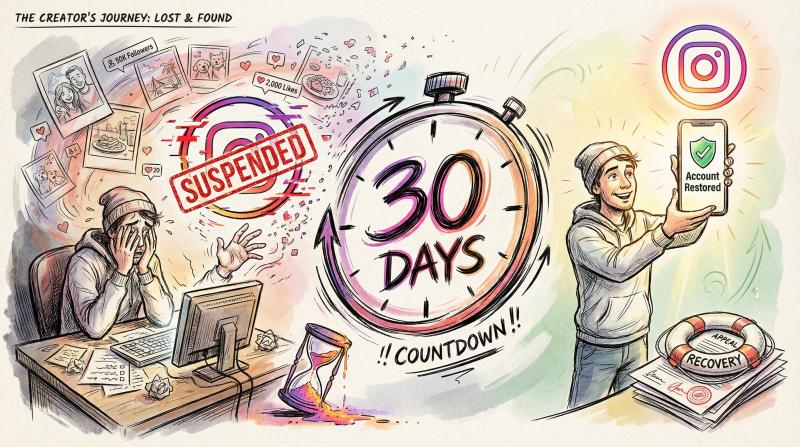
your Instagram account just got suspended. your heart sinks. years of content, followers, memories might be gone.
but take a breath.
most suspended accounts can be recovered if you act fast and follow the right steps.
Time is critical. Instagram gives you 30 days to appeal before permanently deleting your account. You need to move quickly.
in this guide, i'll walk through:
- why Instagram suspends accounts
- how to appeal effectively
- what to do when your first appeal fails
- how to prevent this nightmare from happening again
i've pulled together the latest recovery tactics that actually work in 2026.
why Instagram suspends accounts (and how to prevent it)
Instagram doesn't ban accounts randomly. there's always a reason (even if it's not immediately obvious).
understanding why it happened is your first step toward getting your account back.
7 reasons Instagram suspends accounts
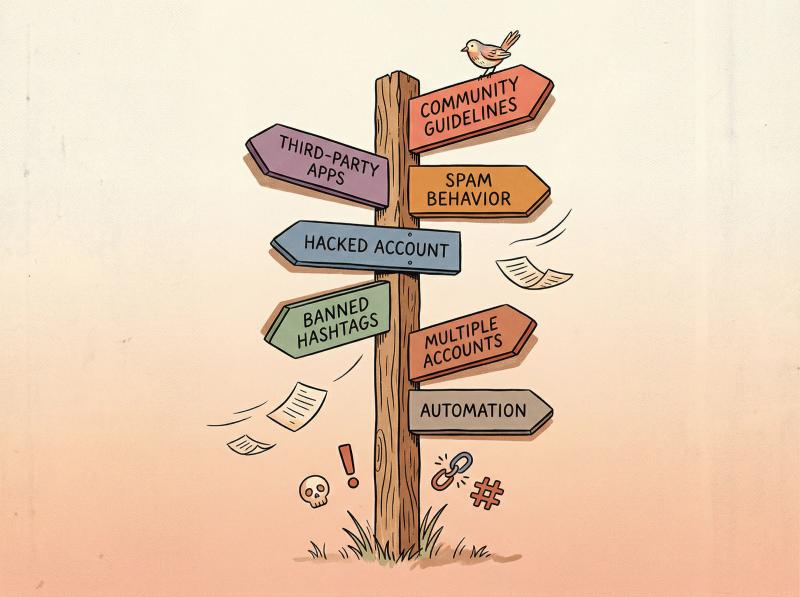
community guidelines violations
Instagram takes its Community Guidelines seriously. content that includes hate speech, nudity, graphic violence, harassment, or illegal activities can trigger an immediate ban. research shows that repeated violations will almost always result in suspension or permanent disablement.
spammy or bot-like behavior
this is where most people get caught.
Instagram's algorithms are constantly watching for automation patterns. research shows that liking over 100 posts per hour or following 30+ accounts too quickly triggers automated suspension as "bot" behavior.
posting identical comments or DMs repeatedly? that looks like spam to Instagram's systems.
third-party apps and automation tools
using unapproved apps that require your Instagram login is risky. Instagram's security systems might suspend your account if a third-party tries to post or pull data in ways that violate their terms. studies indicate that these violations can compound original suspension reasons.
important tip: only use officially approved partners or tools that comply with Instagram's API rules. avoid anything that asks for your password.
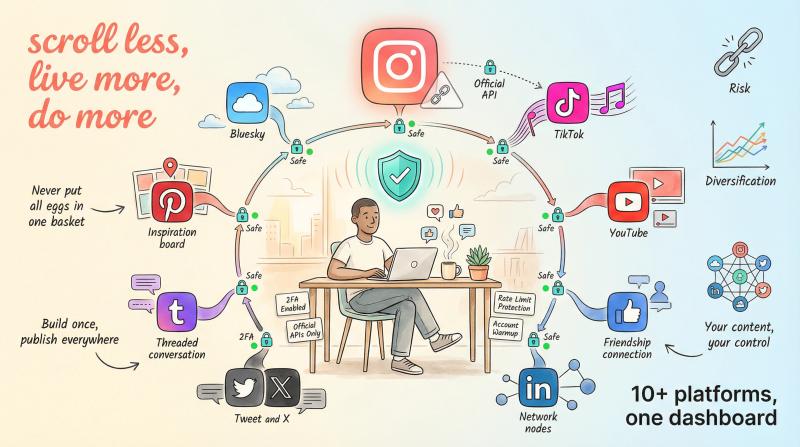
why we built Post bridge differently: we only use official Instagram APIs and never ask for your password. our platform schedules posts through approved Meta channels, keeping your account safe while automating your workflow.
hacked account misuse
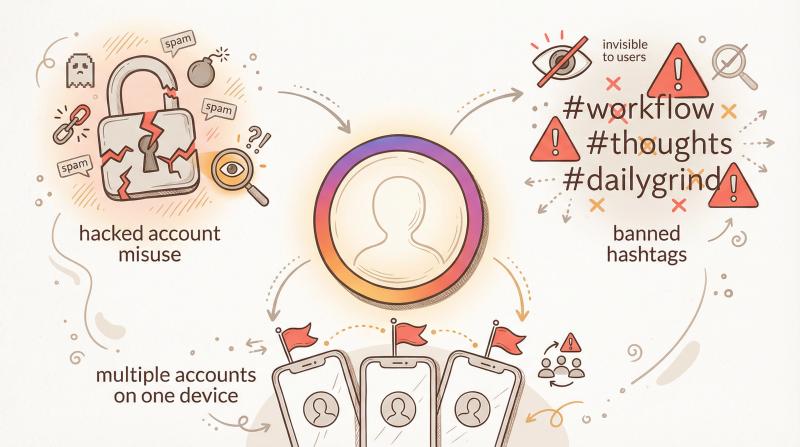
if someone hacks your Instagram and then violates rules by spamming or posting banned content, Instagram may suspend the account for those actions. reports indicate that in these cases, you'll need to both recover your account and explain that the bad behavior wasn't you.
banned hashtags and content
Instagram maintains a hidden list of banned hashtags. using certain hashtags that have been abused for spam (even seemingly normal ones like "#workflow" or "#thoughts") can result in posts being hidden or account flags. research indicates that hashtag stacking with banned or flagged terms creates spam associations that can lead to suspension.
multiple accounts and identity issues
running many accounts on one device or using the same phone number/email for several accounts can appear suspicious. Instagram might temporarily lock accounts if it suspects a single person controlling many profiles in a non-legitimate way. reports show they may ask for identity verification in such cases.
bottom line: if your account was suspended, Instagram believes something violated their rules or appeared unsafe. sometimes it's a mistake (false positives do happen), but you have to follow their procedures to prove your account is legitimate.
Post through official APIs only
post bridge publishes through each platform’s official API, never browser automation, to Instagram, TikTok, X and 7 more platforms. Steady, human-paced posting from one dashboard.
Schedule posts safelysuspended vs disabled Instagram account: what's the difference?
understanding whether you have a temporary block or full suspension matters. the recovery steps differ.
This is the difference that determines your recovery path.
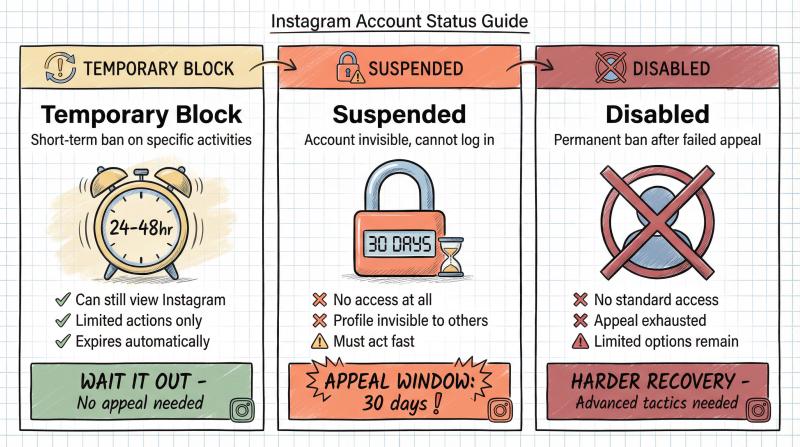
Status - What It Means - Can You Access? - Recovery Path
- Temporary Block - Short-term ban on specific activities (liking, following, commenting) - Yes, can still view Instagram - Wait 24-48 hours, no appeal needed
- Suspended - Account invisible to others, can't log in - No access at all - Must appeal within 30 days
- Disabled - Permanent ban after failed appeal - No access - Limited options, harder to recover
what are temporary Instagram blocks?
these are short-term bans on certain activities. you might get a notice that you're "temporarily blocked from liking posts" or similar. analysis shows these usually last 24 to 48 hours and expire on their own.
your account isn't fully suspended in these cases. you can still log in and view Instagram, you're just limited in actions. wait it out and refrain from the offending behavior.
what happens when your Instagram account is suspended?
this is when you cannot access your account at all and your profile is invisible to others. when you try to log in, you see a message that your account is suspended or disabled due to a violation.
at this stage, you must appeal to get it back. it won't automatically come back with time.
when your account is first suspended, Instagram typically shows a notice upon login:
"We suspended your account on [Date]. You have 30 days to disagree with this decision before your account will be permanently disabled."
this initial suspension is essentially a warning and a window. your account is in limbo (invisible, unusable, but not yet deleted). you can and should appeal during this period.
how long before Instagram permanently deletes your account?
Instagram states that after a deletion, data is retained up to 90 days on their servers. but with a suspension they give a broader grace period. research reveals that Instagram keeps suspended account data for about 180 days (6 months) before it's permanently erased.
your ability to appeal through normal channels is much shorter though. usually you get 30 days to submit an appeal via the app or Help Center. after 30 days, the standard "disagree with decision" button might disappear.
you may still recover the account with extra effort (because the data is still there for up to 180 days), but your odds drop significantly after the first few weeks.
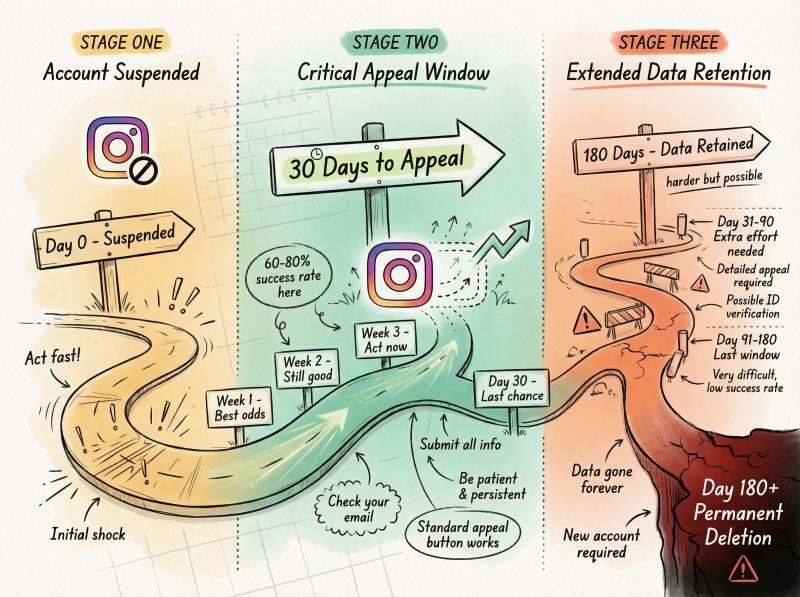
don't wait. start the appeal process as soon as you discover your account is suspended (ideally within that initial 30-day window).
“30 days” or “180 days”? what your suspension screen actually means
this trips everyone up, because Instagram shows different numbers to different people. both screens are real:
the 30-day screen is the classic one: “you have 30 days to disagree with this decision before your account will be permanently disabled.” that 30 days is your appeal deadline, not a countdown to recovery.
the 180-day screen shows up mostly for accounts covered by EU rules (the Digital Services Act). it means your account is held in a suspended state and stays recoverable for up to 180 days.
here's the part people get wrong: 180 days is not a longer appeal window to relax into. it's how long Meta keeps your data before deleting it. your account does not come back on its own when the timer ends, and appeals still get much harder after the first month.
whichever number you see, treat it the same way: appeal now, this week.
how to appeal a suspended Instagram account
regaining a suspended Instagram account starts with an appeal to Instagram. here's exactly what to do:
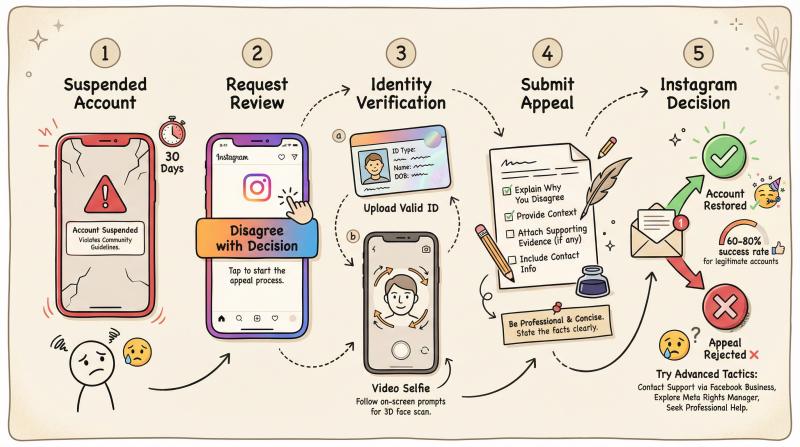
step 1: how to request a review through the Instagram app
the fastest way to initiate an appeal is through the Instagram app itself. attempt to log in with your username and password. you should see a message about your account status, along with an option to disagree with the decision or request a review.
tap the appropriate button to begin the appeal. Instagram's official resources confirm this is the primary channel.
important: you can only do this initial in-app appeal once per suspension. take it seriously.
step 2: complete Instagram identity verification
as part of the appeal, Instagram will likely ask you to prove you are the account owner and a real person. this often includes:
submitting a government ID
you may be prompted to upload a clear photo of your driver's license, passport, or other official ID that matches the name on the account. documentation guides recommend gathering government ID, business documents if applicable, and preparing account history details.
video selfie verification
in many cases, Instagram requires a short selfie video where you turn your head in different directions to confirm you're a real human. this is an automated identity check.
follow the on-screen instructions carefully:
- do it in a well-lit area with your face clearly visible
- no filters, hats, or sunglasses
- make sure your features are clearly identifiable
research shows that about 15% of users fail the video-selfie verification due to poor lighting or image quality. if you fail it, Instagram might not proceed with the review.
take your time and get it right.
step 3: how to write an effective Instagram appeal
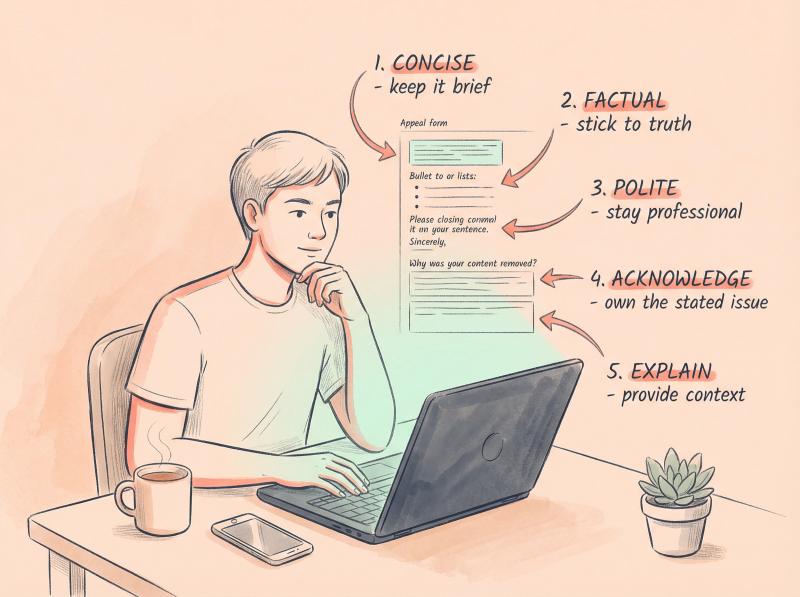
after verification, Instagram gives you a box to explain the situation (older guides point you at a public appeal form, but Meta retired that — those links now just bounce to the Help Center homepage). keep your explanation concise, factual, and polite.
acknowledge the stated reason for suspension if Instagram provided one. briefly state why you believe it's a mistake or what you've done to address the issue.
a successful recovery approach used this format:
"My account was disabled for spam, but i believe this was an error. i was manually liking posts, not using bots. i've reviewed the guidelines and i'm committed to following them."
be professional. a real person might read this.
step 4: what to do after submitting your appeal
once you've completed the steps, you'll see a confirmation that your appeal has been submitted. Instagram will now review your case.
do not submit multiple appeals immediately. strategic appeal timing research shows you need to give them time to respond. typically, you'll get an email response or app notification with their decision.
standard appeals are often processed in 24 to 72 hours. keep an eye on the email tied to your Instagram account. also check your spam folder just in case.
what to avoid while waiting for Instagram's response
avoid any actions that could complicate things:
don't keep trying to log in repeatedly. it won't help and could raise additional security flags.
definitely don't create a new Instagram account in the meantime to "get around" the ban. research warns that logging into a new account from the same device/IP can link to your suspended account and be seen as ban evasion, potentially hurting your appeal.
hold off on further appeals through other channels for a few days. spamming Instagram with multiple requests can actually delay your case by creating duplicate tickets.
step 5: understanding Instagram's appeal decision
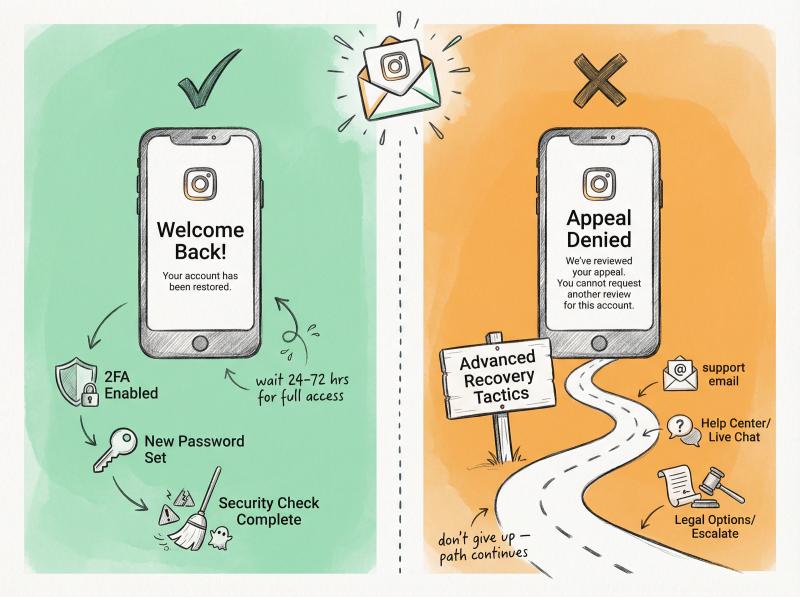
you should get a reply. there are two likely outcomes:
account restored ✓
great news! they reversed the decision. you'll be able to log in again, and your account should function normally. it might take a few hours for full functionality to return.
use this chance to tighten your security:
- enable two-factor authentication
- change your password
- clean up anything that might have triggered the suspension
appeal rejected ✗
if Instagram sticks with the suspension, you'll see a message that your account is permanently disabled and you "cannot request another review" via the app.
this is disheartening.
But it doesn't have to be the end.
it simply means the standard appeal path is exhausted. move on to the advanced recovery tactics below.
managing multiple accounts safely: if you run social accounts for multiple brands or clients, Post bridge lets you manage them from one dashboard while using official APIs that keep each account in good standing. no password sharing, no suspicious logins from different IPs.
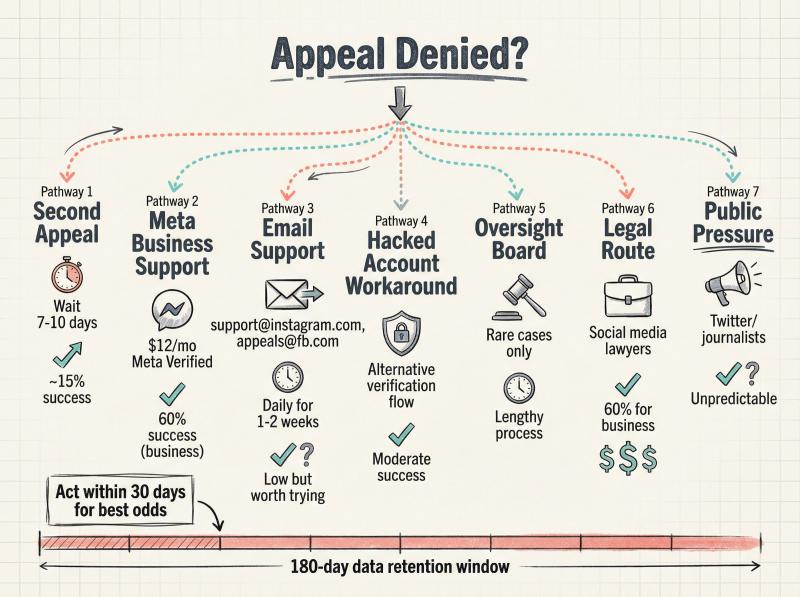
Instagram appeal denied? 7 advanced recovery tactics
the first appeal didn't work. don't panic or give up hope.
many users have managed to get their accounts back through persistence and alternate channels.
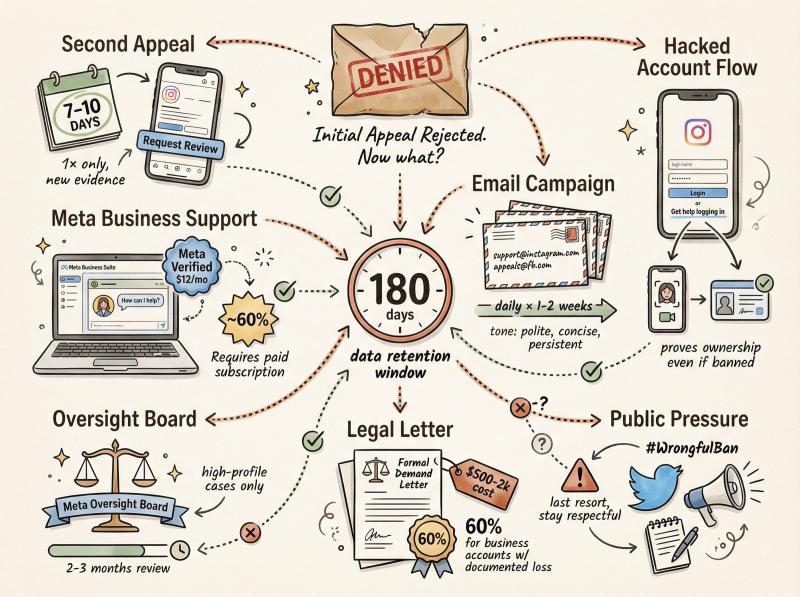
remember, Instagram retains your account data for up to 180 days. so until that window closes, recovery is still possible.
when and how to submit a second Instagram appeal
if you got a generic rejection with no option to appeal again, sometimes waiting about a week and then checking the app can help. in some cases, the "Request Review" button might reappear after some days, allowing a second appeal.
if you do try a second appeal, only do it once and only after waiting at least 7 to 10 days. research on appeal timing shows that a too-quick repeat appeal can be filtered out as spam.
in your follow-up appeal, provide any additional evidence or clarification that you didn't include the first time. keep it professional and factual.
how to contact Meta support for Instagram account recovery
Instagram is owned by Meta. if your Instagram is connected to a Facebook account or if you have a business account, you might have access to Meta's support.
Meta business suite support
if your suspended IG was a business or creator account linked to a Facebook Page, log into Facebook and access the Meta Business Support chat. some users report that paying for Meta Verified (the subscription for verified badge and support) can give you access to live chat support.
politely explain that your Instagram account was disabled and you believe it's a mistake. ask if they can escalate it. the first-line support might be limited, but insist (politely) on escalation.
a successful recovery case involved subscribing to Meta Plus for \$12/month specifically to get access to live support. they chatted with support, explained the situation, and got escalated. within a week, their account was restored.
note: this is not guaranteed, and support agents often say they can't promise anything. but a human review via Facebook's support could help behind the scenes.
email Instagram support
Instagram famously doesn't have a phone number to call, but there are emails like support@instagram.com and Facebook's appeals@fb.com. some users have taken to emailing these addresses daily with a polite appeal message.
the success rate is hard to verify. some people get automated responses, others swear it helped. if you try this, keep your email concise (similar to the appeal text you submitted) and include your account username, the date of suspension, and a plea for review.
do not spam hundreds of emails. a brief daily email for a week or two is plenty.
Instagram hacked account recovery: an alternative appeal method
this is a bit of a workaround.
if your account was banned for "violating terms" and the normal appeal isn't working, you can approach it as if your account was hacked and you're trying to recover it.
go to the Instagram login screen and tap "Get help logging in". follow the prompts for "I can't access this email or phone" and eventually select options that your account was hacked.
Instagram may then ask you to verify your identity by sending a code to your email or doing a video selfie again.
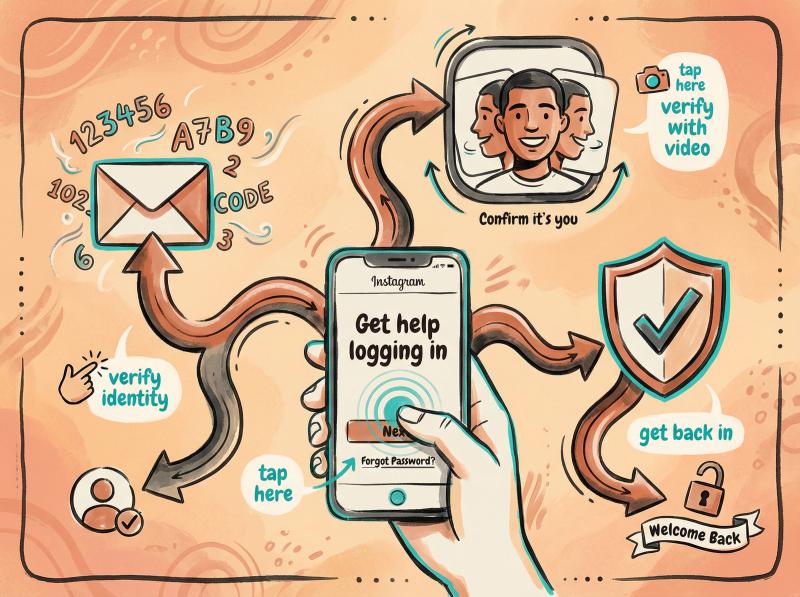
why do this? because it might route you to a support flow where a human will review your account ownership. some users have had their account reinstated through this method, especially if the ban was a false positive.
by proving you are the rightful owner and didn't actually do something wrong, the support might restore access. this method is not officially for suspended accounts, but if you're hitting dead ends, it's worth a try.
how to appeal to Meta's oversight board
Meta has an independent Oversight Board that reviews certain content moderation decisions. in rare cases, if your account was suspended due to specific content and you believe it was a serious mistake, you can escalate to the Oversight Board.
first, you must go through the normal review and get a final decision from Instagram. then, if eligible, Instagram will mention in your final notice that you can appeal to the Oversight Board.
The Meta Oversight Board provides an independent review path for serious cases.
this process is lengthy. you have to submit a case to the Board and they will decide if they want to hear it. only a tiny fraction of cases are taken up, but the Board has overturned some Instagram bans.
this route is usually for exceptional or high-profile cases. but it exists as a last resort if you feel your case has broader significance.
should you hire a lawyer for Instagram account recovery?
if an Instagram account is mission-critical for your business or brand, and nothing else has worked, there are professionals who specialize in these situations.
social media lawyers
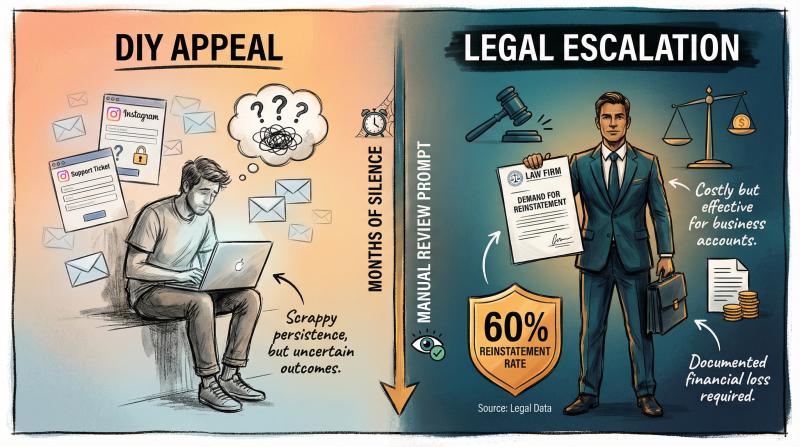
there are attorneys who focus on digital accounts and can send formal letters to Meta. according to legal experts, a well-crafted legal demand letter (especially if you have evidence that the ban is unjust) can sometimes prompt a manual review by Instagram's legal team.
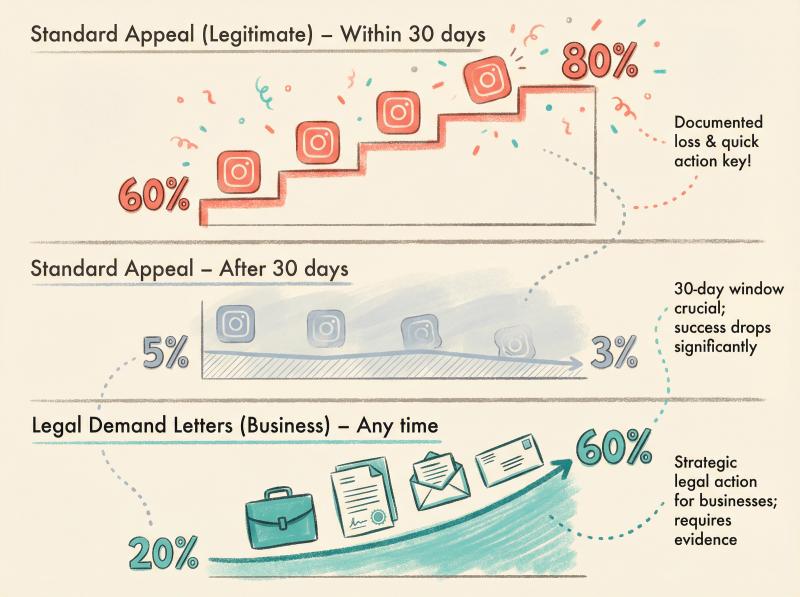
this is usually effective only if significant stakes are involved. for business accounts with documented financial loss, legal letters have about a 60% success rate in getting accounts reinstated.
keep in mind, this can be costly. weigh it against the value of the account.
public press and social media pressure
as a very last tactic, some creators have resorted to making noise publicly. posting on Twitter about the unfair ban, contacting tech journalists to highlight the issue, or sharing the story in online communities.
occasionally, a high-profile callout can lead to Instagram staff taking a second look (especially if an article gets written about wrongful bans).
this is unpredictable and could backfire. it should never involve hate or threats. but if you have a compelling, clearly mistaken-ban story, public pressure can sometimes move the needle.
throughout these advanced attempts, remember to stay courteous and honest. any communication with Instagram or Meta staff (or Oversight Board) should be respectful. you're trying to get them on your side to help you.
anger, spamming, or falsifying information will do more harm than good.
Prevention is your best defense.
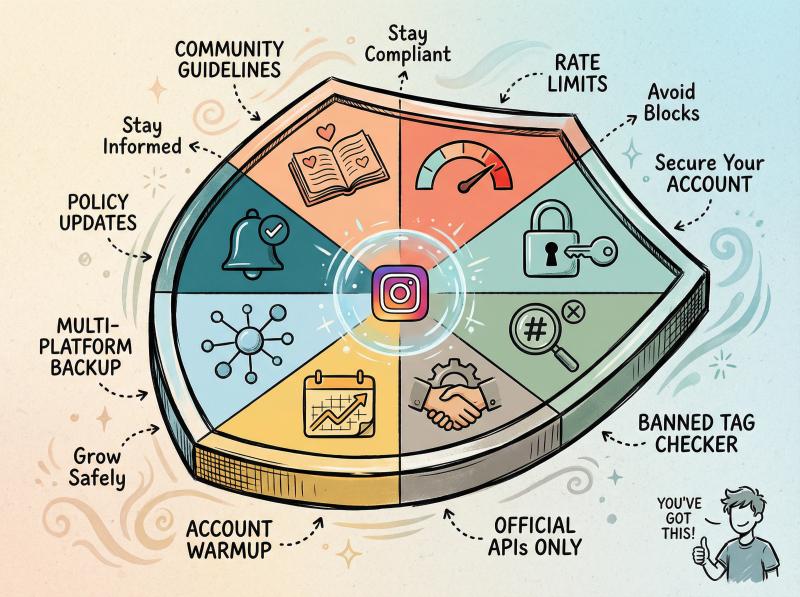
8 ways to prevent Instagram suspension
recovering your account is a relief. but you never want to go through that nightmare again.
here's how to keep your Instagram account in good standing and avoid future bans.
Instagram community guidelines: what you need to know
this sounds obvious, but it's the foundation. don't post content that even borders on Instagram's prohibited material. if you think "is this allowed?" → err on the side of caution.
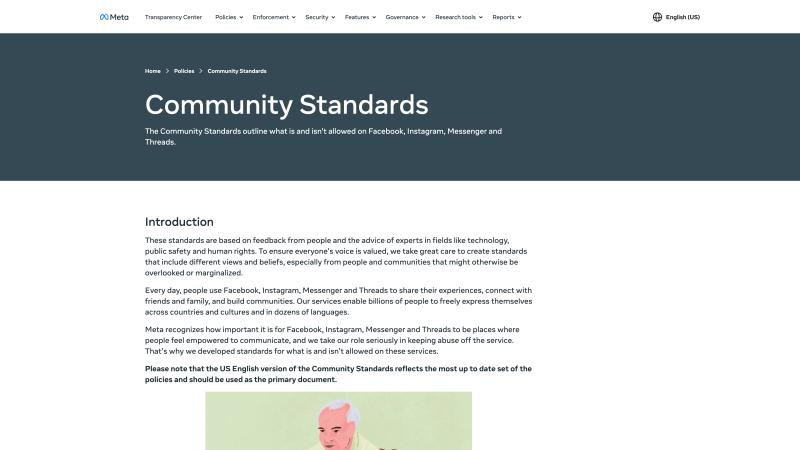
Instagram's Community Guidelines detail every content policy you need to follow.
things like sexual content, hate speech, graphic violence, illegal product sales are strict no-go areas. even milder content (swearing, edgy jokes) can get flagged by AI systems if taken out of context.
following social media best practices is essential for long-term account health.
Instagram automation limits: how to avoid spam detection
avoid any behavior that appears spammy or bot-like.
limit mass actions
keep your follows, likes, comments to a natural human pace. social media experts recommend not exceeding roughly:
Action Type - Safe Limit per Hour
- Likes - 60 likes per hour
- Follows - 20 follows per hour
- Comments - 10 to 15 comments per hour
rapid-fire actions trigger spam detectors. spread out your activity across the day instead of doing it all in one burst.
vary your content and captions
if you manage multiple Instagram accounts, don't post the exact same content or caption on all of them simultaneously. that can trip Instagram's duplicate content sensors. add some variation (even small changes help).
understanding Instagram post vs story vs reel dynamics can help you diversify your content strategy naturally.
use trusted tools wisely
it's okay to use scheduling or analytics tools. many professionals do (including creators who use Post bridge for cross-posting). but use ones that comply with Instagram's API limits and avoid giving your password to any third-party.
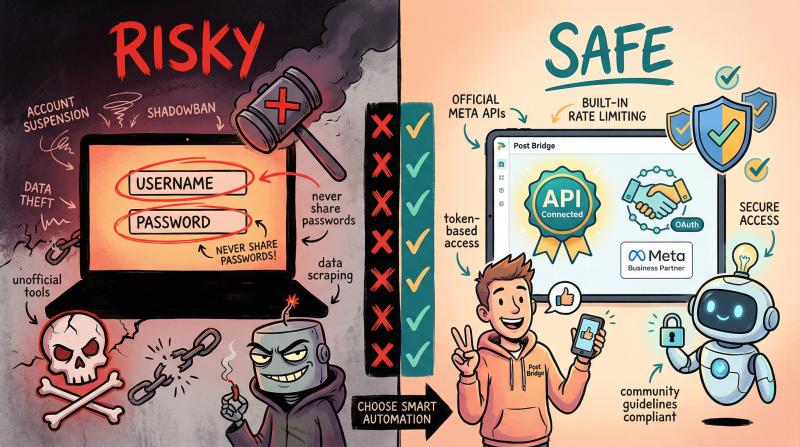
if a tool is officially integrated via Facebook Login or Instagram API, it's generally safe. still, even with safe tools, don't schedule spam. the content and frequency are up to you.
why Post bridge is different: we schedule through official Meta APIs, never ask for passwords, and include built-in rate limiting to keep your account safe. our platform helps you automate without triggering Instagram's spam detection.
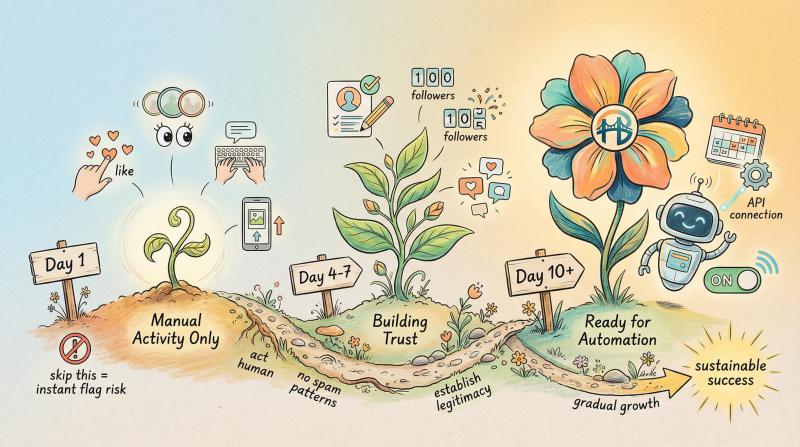
how to warm up a new Instagram account safely
if your account is brand new (or if you create another account in the future), be very careful in the first couple of weeks. Instagram closely monitors new accounts for spam signals.
one proven strategy is to warm up the account:
① spend the first 7 to 10 days just using Instagram normally
browse, like a few things, post some Stories or a couple of regular posts manually. research on account warm-up strategies shows that initial manual posting phases help establish legitimacy.
fill out your profile bio and picture. essentially, act like a human, not a bot, to establish a healthy account history.
② avoid any automated posting initially
research confirms that avoiding automation on new accounts prevents immediate flags. once you've posted a handful of times manually and maybe gained a small amount of engagement, you can slowly start using scheduling tools or adding the account to third-party services.
this warm-up period greatly reduces the risk of immediate suspension for "suspicious behavior." many people who skip this and dive straight into aggressive posting on a fresh account get flagged within days.
for a complete guide on account creation best practices, check our growth guide.
why you need two-factor authentication on Instagram
protect your account from hackers by turning on 2FA (found in Instagram's Security settings). this means even if someone somehow guesses your password, they can't log in without a code from your phone.
it's one of the best ways to ensure you control your account at all times. it also shows Instagram that you're a legitimate user concerned about security.
how to audit Instagram connected apps and permissions
periodically review which apps and websites are authorized on your Instagram (under Settings → Security → Apps and Websites). remove access for anything you don't recognize or no longer need.
some old third-party apps might not follow today's rules and could put you at risk. also avoid signing in to shady services with your Instagram.
Instagram banned hashtags: how to avoid them
we mentioned banned hashtags earlier. how do you avoid them?
don't copy-paste huge blocks of hashtags from random sources. use relevant tags and keep it reasonable (e.g. 5 to 15 hashtags, not 30 on every post).
be cautious with very generic words or phrases as tags. if you notice a hashtag doesn't show any recent posts, it might be banned. when in doubt, skip it.
stay updated via creator communities or blogs about newly banned tags. occasionally, Instagram might ban a tag temporarily if it gets abused.
how to stay updated on Instagram policy changes
Instagram's policies evolve. make a habit of scanning Instagram's official blog or creator news every few months to see if any rule changes might affect you.
platform policy awareness research shows that staying informed reduces violations by up to 70%. for example, if Instagram announces a crackdown on a certain behavior (like using certain engagement pods or contests), adjust your strategy to stay compliant.
why you should diversify beyond Instagram
this might not prevent an Instagram suspension. but it can prevent a single suspension from derailing your entire online presence or business.
if you're a creator or entrepreneur, consider building an audience on multiple platforms:
✓ TikTok
✓ YouTube
✓ Threads
✓ Bluesky

that way, if one platform bans you, you still have others. also maintain an email list or website for direct contact with your followers.
research on platform diversification shows this redundancy is a safety net. many savvy creators learned not to put all eggs in one basket.
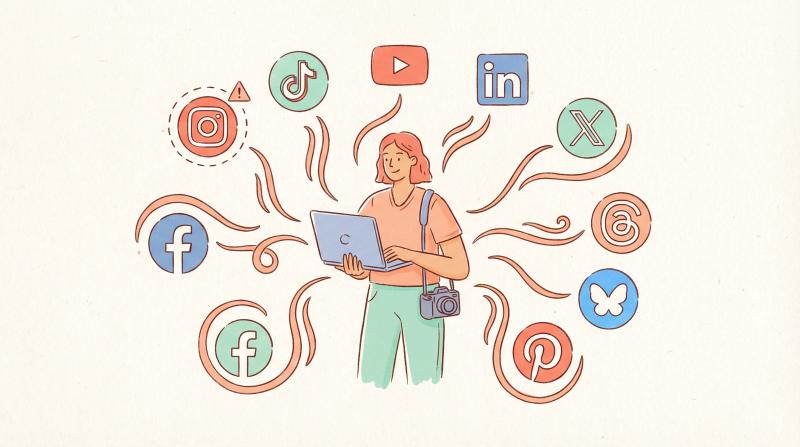
multi-platform made simple: this is exactly why we built Post bridge. create your content once and publish it across Instagram, TikTok, YouTube, Facebook, LinkedIn, Twitter, Pinterest, Threads, and Bluesky (all from one dashboard). if one platform has issues, your other channels keep running.
can't recover your Instagram account? here's what to do
sometimes, despite your best efforts, an Instagram account might truly be gone.
if you find yourself in that unfortunate situation, here are a few final tips.
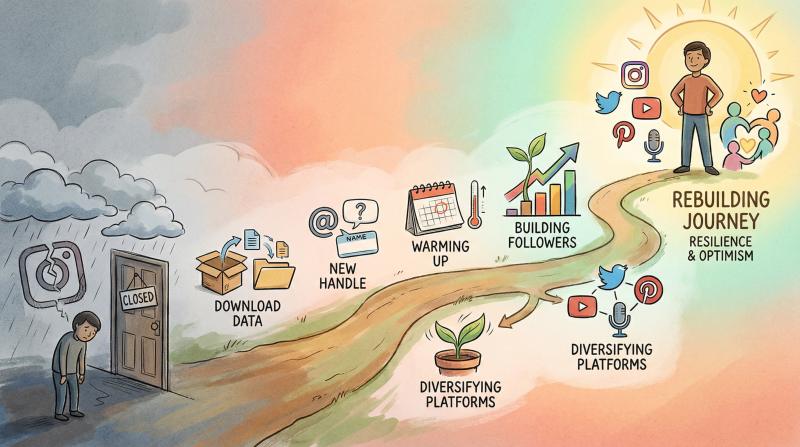
how to download your Instagram data before it's deleted
if your account was disabled, Instagram should give you an opportunity to download your data (photos, videos, messages). use that link while it's available.
it might be via the "Download Your Information" button on the app/website or a link emailed to you. this way, you at least have copies of your content.
how to create a new Instagram account after suspension
you can start fresh. but do not simply create the new account on the same device/IP immediately after a ban. Instagram might link it.
it's best to:
① wait a little
② use a different email/phone
③ avoid the exact same username
when you start the new account, remember the "warm up" advice above. explain to your followers (on other platforms) that your old account was removed and to follow the new one.
before choosing your new handle, use our Instagram username checker to verify availability.
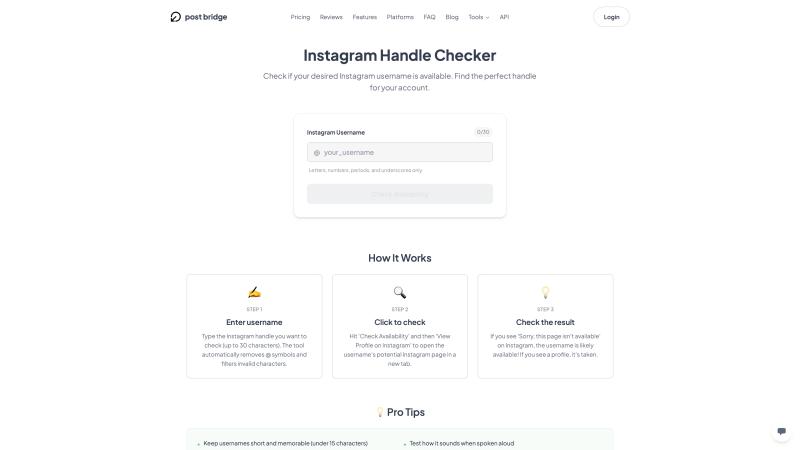
The username checker instantly verifies handle availability across Instagram.
it's disheartening, but many creators have rebounded from losing an account by rebuilding step by step. our growth guide can help you rebuild faster with proven strategies.
what to learn from getting your Instagram suspended
analyze what might have caused your suspension and be extra careful not to repeat that. if it was an unclear reason, then be generally more cautious with your activities on the platform.
how to rebuild after losing your Instagram account
it's tough to lose an account with years of photos, DMs, and followers. but try to view it as a learning curve.
in the long run, having a direct connection to your community (via email lists, personal websites, or multiple social profiles) is healthier than relying 100% on a platform that you don't control.
if you're rebuilding, check out our guide on how to get 1k followers on Instagram and how to go viral on Instagram to accelerate your growth.
frequently asked questions
how long does Instagram take to respond to an appeal?
most appeals are processed within 24 to 72 hours. complex cases or appeals that require manual review can take up to a week though. check both your email inbox and spam folder for Instagram's response.
can i create a new Instagram account while my old one is suspended?
not recommended. creating secondary accounts while appealing can link those accounts to suspended profiles automatically. Instagram can see this as ban evasion and permanently disable both accounts. wait until your appeal is resolved.
will paying for Meta Verified help me recover my suspended account?
maybe.
Meta Verified (\$12 to \$15 per month) gives you access to live customer support. some users successfully recovered their accounts by subscribing, chatting with support, and getting their case escalated to a human reviewer. it's not guaranteed, but it's an option if other methods fail.
how many times can i appeal a suspended Instagram account?
officially, you get one appeal through the in-app process. after that, Instagram says you "cannot request another review."
you can try alternative channels though (like Facebook support, hacked account recovery flows, email appeals, or the Oversight Board). just wait at least 7 to 10 days between attempts to avoid being flagged as spam.
what's the success rate of Instagram suspension appeals?
Method - Timing - Success Rate
- Standard appeal (legitimate account) - Within 30 days - 60% to 80%
- Standard appeal - After 30 days - Single digits
- Legal demand letters (business accounts) - Any time with documented loss - ~60%
can using scheduling tools like Post bridge get my account suspended?
no (if you use tools that work through official Instagram APIs).
Post bridge schedules posts through approved Meta channels and never asks for your password, which keeps your account safe. the risk comes from using unauthorized third-party apps that violate Instagram's terms or from posting spam content. as long as your content follows Community Guidelines and your tool uses official APIs, scheduling is safe.
how do i know if my hashtags are banned?
there's no official list, but you can check individual hashtags. search for a hashtag in Instagram. if no recent posts appear or you see a warning message, it's likely banned or restricted. avoid using hashtags that seem suspicious or that you found in random "hashtag lists" online. stick to relevant, specific hashtags for your content.
what should i do if my account was hacked and then suspended?
use the "hacked account" recovery flow on Instagram's login screen. select "Get help logging in" and follow the prompts for account compromise. you'll need to verify your identity with ID or video selfie. in your appeal, clearly explain that your account was compromised and that the rule violations were done by the hacker, not you.
is there a phone number i can call to recover my Instagram account?
no.
Instagram doesn't offer phone support for individual users. your options are:
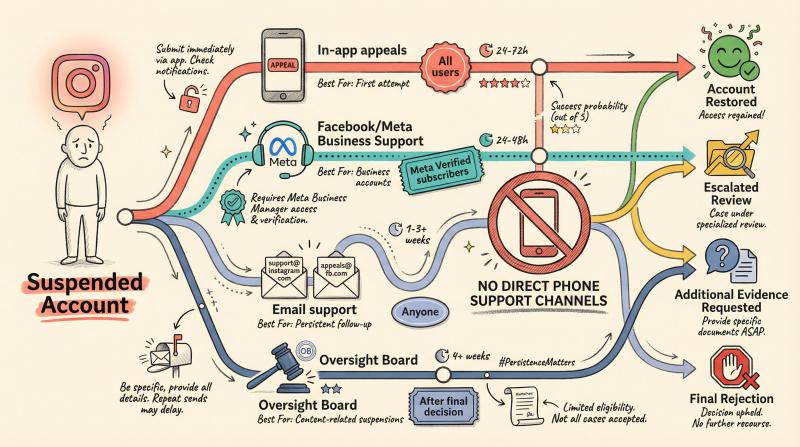
Support Channel - Best For - Access
- In-app appeals - First attempt - All users
- Facebook/Meta Business Support - Business accounts - Meta Verified subscribers
- Email support - Persistent follow-up - support@instagram.com, appeals@fb.com
- Oversight Board - Content-related suspensions - After final decision
how can i prevent my Instagram from being suspended in the future?
follow these key practices:
✓ stay within Instagram's activity limits (60 likes/hour, 20 follows/hour, 10-15 comments/hour)
✓ use official API tools for scheduling (like Post bridge)
✓ enable two-factor authentication
✓ warm up new accounts with manual posting for 7 to 10 days
✓ avoid banned hashtags and duplicate content
✓ review and remove suspicious connected apps
✓ follow Community Guidelines strictly
✓ diversify your social presence across multiple platforms
final thoughts
a suspended Instagram account feels like the end of the world (especially if you've built a community or business around it).
but most wrongful suspensions can be reversed if you act quickly and follow the right steps.
start your appeal immediately. provide clear identity verification, be polite and professional in your communications, and don't give up after the first rejection. many accounts get restored through persistence and trying alternative channels.
moving forward, protect your account by:
- following Instagram's rules
- using approved tools
- enabling security features
- building your presence across multiple platforms
remember: your content and community are too valuable to rely on a single platform. diversify, automate safely, and always have a backup plan.
ready to manage your social media presence more safely? Post bridge helps you schedule to 10+ platforms using official APIs, keeping your accounts safe while saving you hours every week. try it free today.