









Manage Social Media
From Your AI.
Connect Post Bridge to Claude, ChatGPT, Cursor, or any MCP-compatible AI. Schedule posts, check analytics, manage accounts — all from the chat.
One click from the official directories: Claude · ChatGPT. Everyone else: one URL, sign in with OAuth, no API key.
This is what it looks like:
Just tell your AI what to do.
No dashboards. No scheduling tools. Just a conversation.
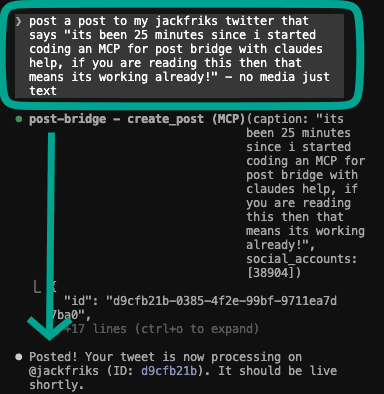
Post to my Twitter that says "just shipped MCP support for post bridge, you can manage all your socials from Claude now"
Done. Your tweet is now processing on @jackfriks (ID: d9cfb21b). It should be live shortly.
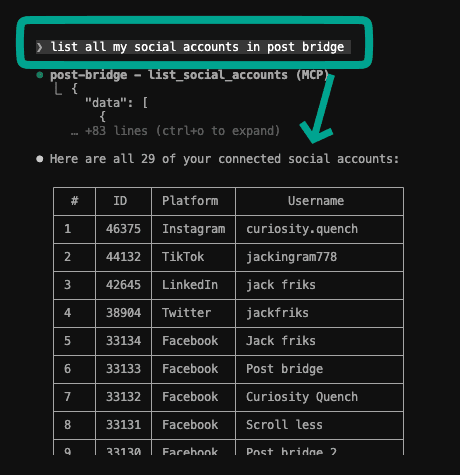
List all my social accounts in post bridge
Here are all 29 of your connected social accounts across Instagram, TikTok, LinkedIn, Twitter, Facebook, YouTube, and more.
Schedule a post for tomorrow at 9am to my Instagram and TikTok
Scheduled. Post goes out tomorrow at 9:00 AM to curiosity.quench (Instagram) and jackingram778 (TikTok).
Connect it in under a minute
One URL for every agent. Sign in when your agent asks - and if yours only takes a URL (hi Grok), your API key rides along inside it.
https://www.post-bridge.com/api/mcp/mcpClaude
One click, no config
- 1Open post bridge in the Claude connector directory
- 2Hit Connect and sign in. That's the whole setup
ChatGPT
Native app
- 1In ChatGPT, open Apps and search “post bridge”
- 2Connect your account when prompted
Grok
Key in the URL
- 1Grab an api key from dashboard → api keys
- 2Add a connector with the URL below, key pasted in
https://www.post-bridge.com/api/mcp/mcp?key=YOUR_API_KEYClaude Code
One terminal command
- 1Run the command below
- 2That's it, sign in on first use
claude mcp add --transport http post-bridge https://www.post-bridge.com/api/mcp/mcpUsing a different agent? Cursor, Windsurf, OpenClaw, Hermes, your own: any tool that supports MCP works. Paste this wherever it takes a server config:
{
  "mcpServers": {
    "post-bridge": {
      "type": "http",
      "url": "https://www.post-bridge.com/api/mcp/mcp"
    }
  }
}Full walkthroughs per client in the setup docs.
Everything you need. Zero UI.
16 tools your AI can use to manage your entire social media presence.
Schedule posts
Create and schedule posts to any connected platform. Set captions, media, and per-platform overrides.
View analytics
Check views, likes, comments, and shares across all platforms. Sync fresh data on demand.
Manage accounts
See all your connected social accounts — platforms, usernames, and account IDs at a glance.
Check results
See if each platform post succeeded or failed, with detailed error info when something goes wrong.
Manage media
Upload from a URL, or ask for an upload link when the file is on your device (up to 500MB). Browse your library and clean up unused files, all from the chat.
Update & delete posts
Edit scheduled posts or delete drafts without ever opening the dashboard.
Ready to post from AI?
One click from the Claude directory. Every other agent: one URL, no API key.
Works with Claude Code, Claude Desktop, Cursor, Windsurf, ChatGPT, and any MCP-compatible client.
Using an AI agent instead? Check out OpenClaw integration.
Using Claude? See the Claude social media manager setup guide.
Weighing up your options? See how the social media scheduling APIs and MCP servers compare, or our honest roundup of the best social media MCP servers.
In the terminal? Schedule posts from Claude Code. On ChatGPT? Schedule posts from ChatGPT.