
You've probably heard the pitch before. Build a YouTube empire without showing your face. Outsource everything. Watch the money roll in while you sleep.
And then you typed "does YouTube automation work" into Google because something felt too good to be true.
Smart instinct.
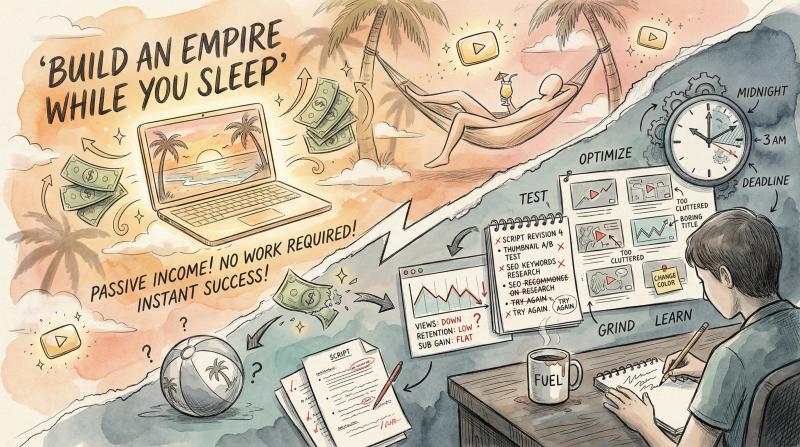
The reality is more nuanced than the gurus selling $5,000 courses want you to believe. YouTube automation can work, but not the way most people think. It's not passive. It's not autopilot. And it's definitely not a guaranteed path to six figures in six months.
But if you're willing to do the actual work (and understand what "automation" really means in practice), there's a legitimate path here. Let me show you what actually works, what's pure hype, and how to tell the difference before you spend a dollar.
What Is YouTube Automation and How Does It Actually Work?
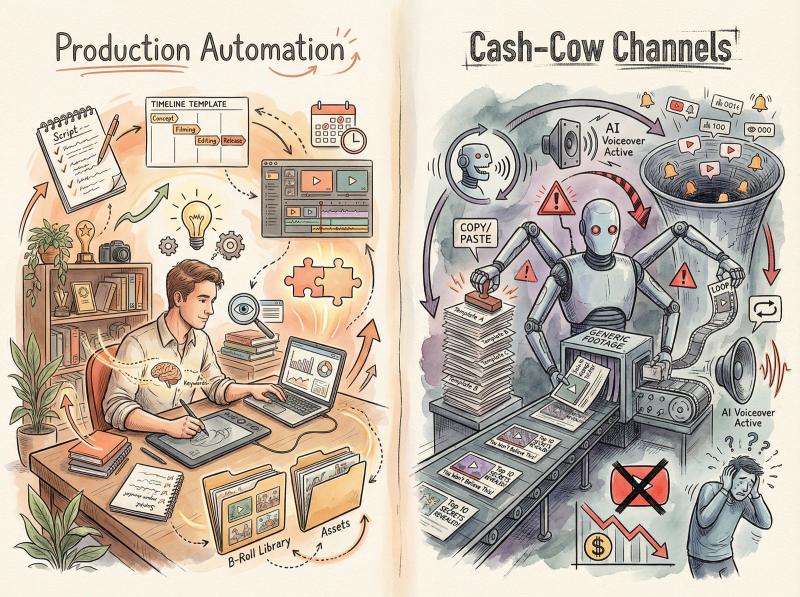
When people talk about YouTube automation, they're usually describing one of two very different strategies:
The first is production automation. This is where you use tools, templates, and outsourcing to remove repetitive tasks from your workflow. Think scriptwriting assistants, B-roll libraries, editing templates, automatic captions, and scheduling software.
You're still creating original content, but you're eliminating the grunt work so you can focus on what actually matters (ideas, strategy, packaging).
This approach is legitimate and sustainable. It's how smart creators scale without burning out.
The second is the "cash-cow" play. This is where people try to build faceless channels that pump out mass-produced content with minimal original input. AI-generated scripts, stock footage, text-to-speech narration, rinse and repeat.
The goal is volume over value, hoping the algorithm won't notice you're running a content factory.
This is where most people get burned.
In July 2025, YouTube updated its monetization policies to explicitly target what it calls "inauthentic content". The platform now actively demonetizes channels that rely on repetitive, mass-produced videos that don't add meaningful value.
Use AI as a tool? Absolutely fine. Try to automate creativity itself? YouTube's reviewers will notice, and your monetization application will get rejected.
What YouTube actually cares about: viewer satisfaction. The algorithm doesn't care if you're on camera or not. It cares if people click your thumbnail, watch your video, and come back for more. Everything else is noise.
Production Automation vs Cash-Cow Channels: What's the Difference?
Let me break this down with specifics, because the difference matters.
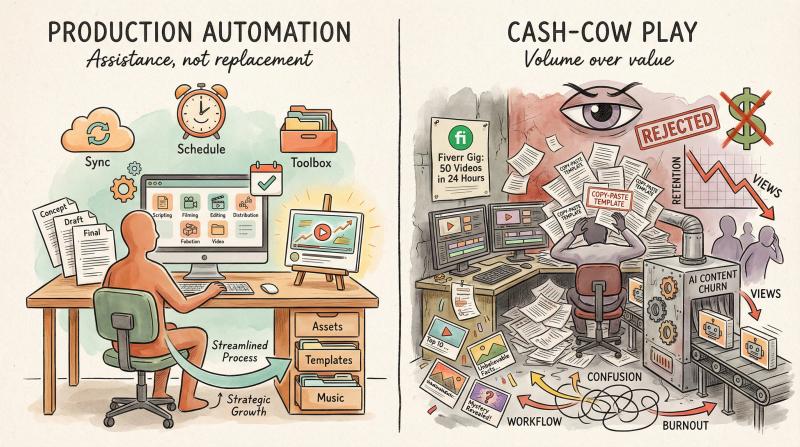
Production automation looks like this:
- You research trending topics in your niche using tools like vidIQ or YouTube's own search suggestions
- You outline videos based on what your audience actually asks about (pulled from comments, Reddit threads, competitor gaps)
- You draft scripts with AI assistance, then heavily edit them to inject your perspective, data, or unique insights
- You use templates for intros, outros, and lower thirds so your editor doesn't start from scratch every time
- You schedule uploads across platforms using tools like Post bridge to maintain consistency without living in your calendar
The key word here is assistance. You're using automation to do what you already know works, but faster.
The cash-cow play looks like this:
- Pick a "proven" niche from a guru's course (usually something saturated like luxury cars or motivational quotes)
- Generate 50 scripts with ChatGPT using the exact same prompt template
- Hire the cheapest Fiverr voice actor or use AI text-to-speech
- Slap together stock footage that vaguely matches the narration
- Upload daily and hope for the best
The fatal flaw? There's no unique value proposition. Nothing differentiates your videos from the hundred other channels doing the exact same thing. And viewers can tell. They bounce. Your retention tanks. The algorithm stops recommending you.
One creator documented their experience trying this approach: 20 videos, months of effort, and they still hadn't hit the monetization threshold of 1,000 subscribers and 4,000 watch hours.
Meanwhile, channels that focused on quality over quantity often hit those milestones with far fewer uploads.
Create once, post everywhere
post bridge publishes and schedules your posts to Instagram, TikTok, YouTube, X, LinkedIn, Facebook, Pinterest, Threads, Bluesky and Google Business Profile from one dashboard.
Try it free for 7 daysWhat Does YouTube's Algorithm Actually Reward?
YouTube's recommendation system is trying to solve one problem: what should I show this specific viewer right now to maximize their satisfaction?
It doesn't do this by checking if you're "automated" or "organic." It does this by watching two primary signals:
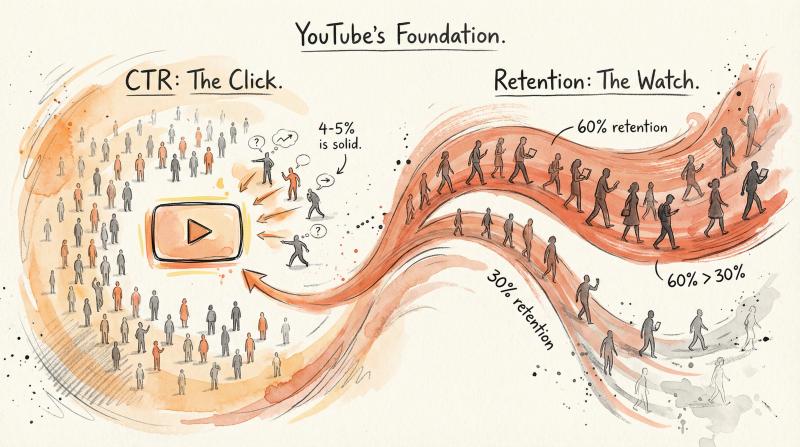
Click-through rate (CTR). When YouTube shows your thumbnail to 100 people, how many actually click? Industry benchmarks vary by niche, but anything above 4-5% is solid for most channels. Below 2%? Your packaging needs work.
Average view duration and retention. Once someone clicks, do they actually watch? Or do they bounce after 10 seconds? YouTube's algorithm heavily weights this. A video with 60% retention will get pushed harder than one with 30%, even if the 30% video got more initial clicks.
Everything else (likes, comments, shares) provides additional signal, but CTR and retention are your foundation. Automate your workflow all you want, but if you can't get people to click and watch, none of it matters.
Critical reality check: The March 2025 update changed how Shorts views are counted publicly. Now a view increments as soon as a Short starts playing (just like TikTok and Instagram). But your earnings and monetization eligibility still depend on engaged views in the background. Don't mistake inflated view counters for actual revenue.
This is actually good news if you're thinking about automation strategically. Because it means you don't need to be on camera to succeed. You just need to consistently deliver videos that people want to watch.
Channels like Bright Side (44+ million subscribers) and WatchMojo (25+ million) have proven faceless content can absolutely work at massive scale. But both invest heavily in production quality, research, and pacing. They're not churning out AI slop.
YouTube Monetization Requirements: What You Actually Need to Know
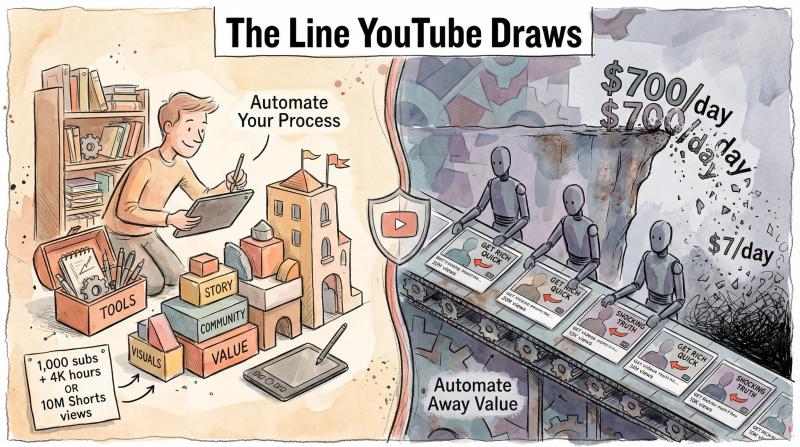
The YouTube Partner Program (YPP) has clear eligibility requirements:
Option A:
- 1,000 subscribers
- 4,000 public watch hours in the last 12 months
OR
Option B:
- 1,000 subscribers
- 10 million public Shorts views in the last 90 days
Once you hit those numbers, you can apply for monetization. But hitting the threshold doesn't guarantee approval.
YouTube's reviewers manually check channels for compliance with monetization policies. And in 2025, they're paying much closer attention to "reused content" and "inauthentic content."
What gets flagged:
- Videos that are primarily compilations of other people's content (even with credit)
- AI-generated listicles that just regurgitate Wikipedia with no original insight
- Channels with hundreds of nearly identical videos using the same template
- Content that relies heavily on unlicensed third-party footage without transformation
- Mass-produced videos that don't provide meaningful value to viewers
What's allowed:
- Using AI tools to assist with scripting, editing, or production (as long as the final product is valuable)
- Faceless channels that use stock footage, voiceovers, and motion graphics (as long as you're adding original commentary or education)
- Outsourcing production to freelancers (perfectly legitimate)
- Scheduling and cross-posting content using automation tools like Post bridge
The line is this: you can automate your process, but you can't automate away the value.
One creator shared their horror story on Reddit. They built a faceless channel to 700,000 subscribers and were making $500-700 per day in ad revenue. Then YouTube flagged them for policy violations. They had to remove over 200 videos, and their daily revenue dropped to $7.
The channel wasn't breaking copyright law, but it was mass-producing low-effort content that triggered YouTube's spam filters.
YouTube AI Disclosure Requirements: What You Need to Know
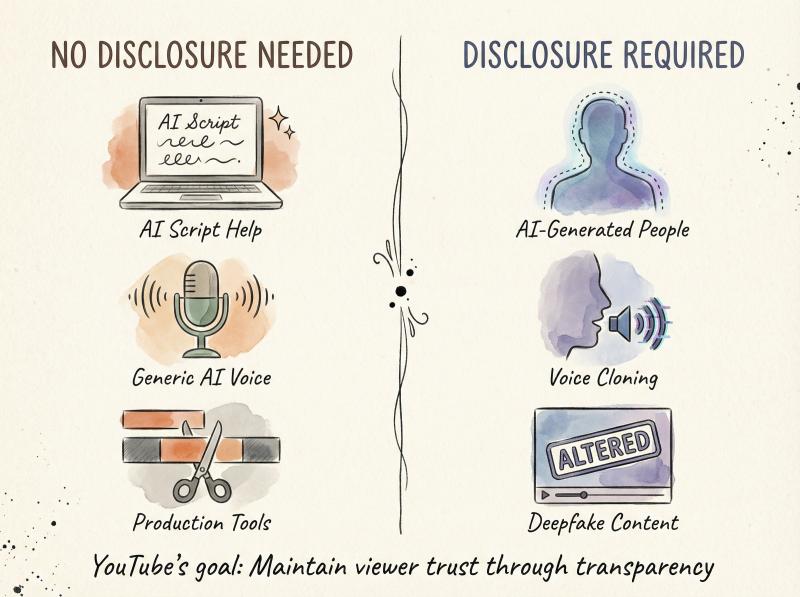
YouTube now requires disclosure when your video contains realistic altered or synthetic media that could mislead viewers. Examples include AI-generated people that look real or synthetic voices impersonating specific individuals.
Using AI to help with scripting? No disclosure needed. Using AI voiceover with a generic voice? Also fine. Creating a deepfake of a celebrity or public figure? You need to disclose that prominently.
The platform isn't trying to ban AI. It's trying to maintain viewer trust by ensuring people know when they're seeing synthetic content that could be mistaken for real.
How Much Money Can You Actually Make? The Real Numbers
This is where most automation dreams die. Because once you factor in actual costs, the math often doesn't work the way gurus promise.
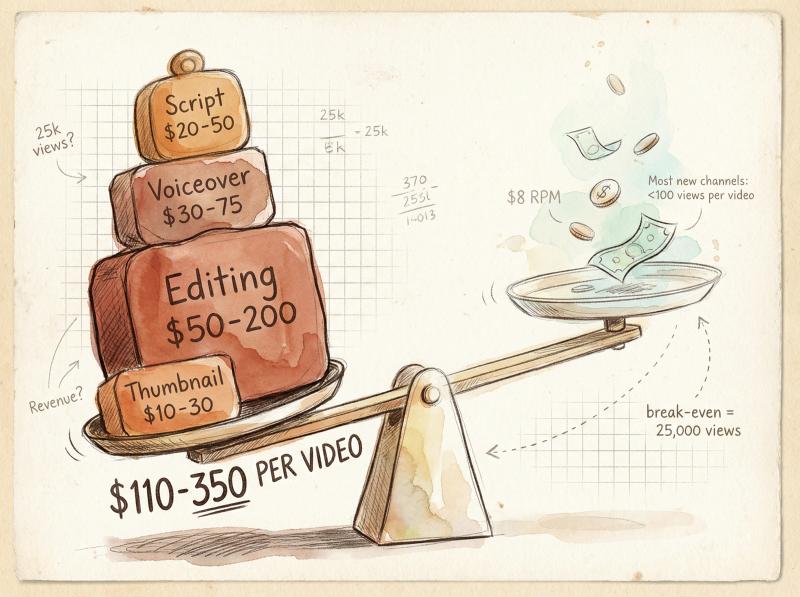
Let's run the numbers with real-world data from 2024-2025 creator reports.
Typical production costs per video (outsourced):
Production Element - Cost Range
- Script - $20-50
- Voiceover (professional) - $30-75
- Voiceover (AI) - $0-10
- Editing - $50-200
- Thumbnail - $10-30
- Total per video - $110-350
Now let's talk revenue. YouTube ad revenue varies wildly by niche, geography, and seasonality. CPM (cost per thousand impressions) and RPM (revenue per thousand views, which accounts for ad blockers and skipped ads) are your key metrics.
Based on recent creator data:
Niche - RPM Range
- Finance, tech, business - $10-30
- Gaming, entertainment - $2-8
- Lifestyle, vlogging - $3-10
Let's say you're in a decent niche with $8 RPM. If your all-in production cost is $200 per video, you need 25,000 views just to break even. And that's assuming every video hits that mark, which is wildly optimistic for a new channel.
Formula to calculate your break-even threshold:
Break-even views = (Total cost per video) ÷ (RPM ÷ 1,000)If your costs are $150 and your RPM is $6, you need 25,000 views per video. At $12 RPM, that drops to 12,500 views.
The problem? Most new channels struggle to get even 1,000 views per video in the first few months. According to data from vidIQ, the median new YouTube channel gets fewer than 100 views per video in the first 30 days.
This is why you can't brute-force YouTube automation with money alone. You need to validate that your content actually works before you scale up production. Otherwise, you're just burning cash making videos nobody watches.
YouTube Shorts Monetization: How It's Different
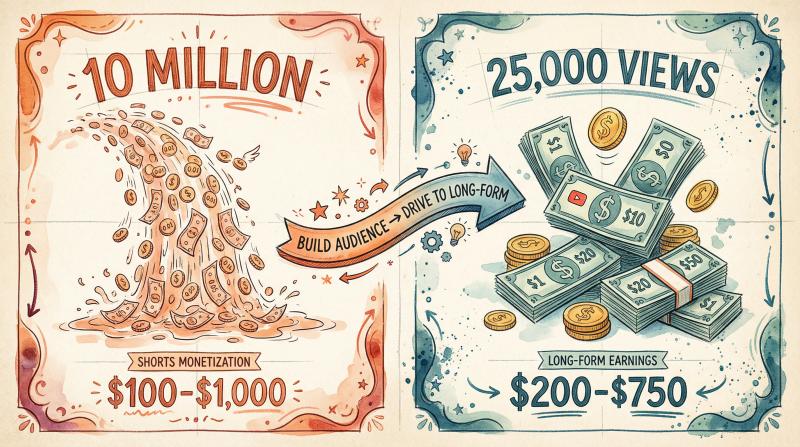
YouTube Shorts uses a different monetization model. Instead of direct ad placement, Shorts creators earn from a revenue pool based on their share of total Shorts views and engagement.
The RPM for Shorts is typically much lower than long-form content, often in the $0.01-0.10 range per 1,000 views. But Shorts can get viral distribution much more easily than long-form videos.
The play here isn't to make money directly from Shorts ads. It's to use Shorts to build your subscriber base and drive traffic to your long-form content (which monetizes better).
Tools like Post bridge make this strategy practical. You can upload a video once, and if it's 9:16 aspect ratio and under 3 minutes, it automatically posts as a YouTube Short. You can simultaneously push that same content to Instagram Reels and TikTok to maximize distribution across platforms.
Real YouTube Automation Results: What Actually Happens
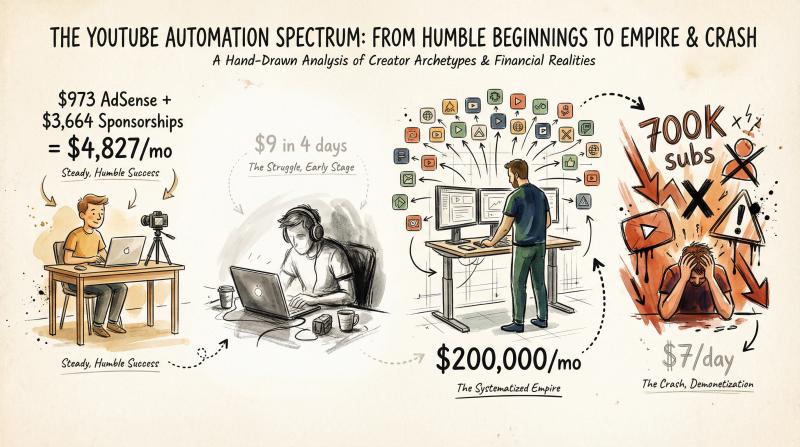
Let's look at some documented results from creators who shared their numbers:
Example 1: Small Faceless Channel (5,800 subscribers)
Monthly earnings breakdown from May 2024:
Revenue Source - Monthly Amount
- AdSense revenue - $973
- Affiliate commissions - $190
- Sponsorships - $3,664
- Total - $4,827
What's notable here? Sponsorships generated almost 4x more revenue than AdSense. This channel focused on building a valuable audience in a specific niche (not disclosed), which made them attractive to sponsors even with a relatively small subscriber count.
Example 2: Gaming Niche (Just Hit Monetization)
This creator documented their first week monetized: $9 in four days. Hardly life-changing, but it shows the typical early-stage reality. Most creators earn almost nothing in their first months, even after hitting the YPP threshold.
Example 3: Successful Multi-Channel Operator
Noah Morris reportedly runs over 25 automated faceless channels, earning an estimated $200,000+ per month total. But this isn't a "I set it up and forgot about it" situation. He's running this like a media company, with systems for research, production, quality control, and optimization.
It's a full-time business operation.
Example 4: The Crash and Burn
As mentioned earlier, one channel grew to 700,000 subscribers and $500-700 daily revenue, then got policy-flagged and dropped to $7 per day after removing 200+ videos. This illustrates the biggest risk with low-effort automation: you can build something that works temporarily, but if it violates YouTube's quality standards, it can collapse overnight.
The pattern across successful examples? They all treat it like a real business, not a passive income hack. They invest in quality, find unique angles in their niches, and continuously optimize based on performance data.
Why Most YouTube Automation Courses Are Scams
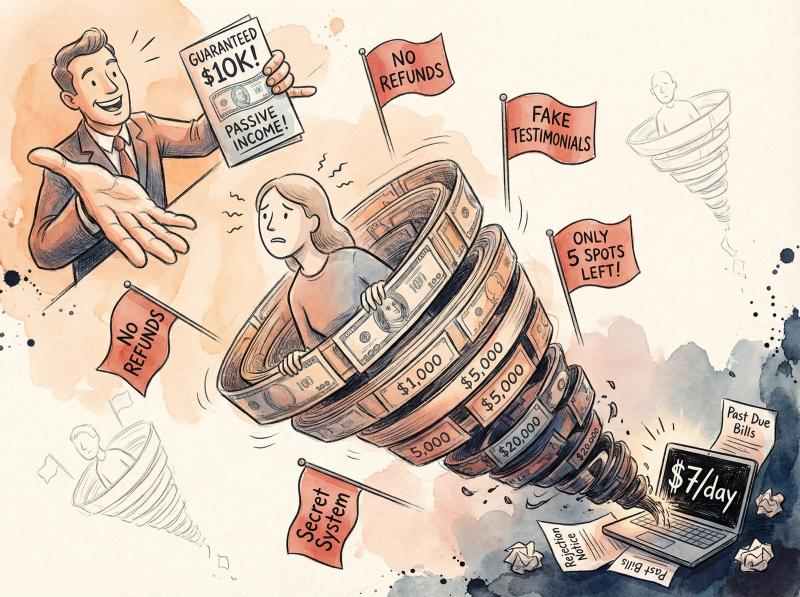
Search for "YouTube automation course" and you'll find programs ranging from $100 to $20,000. Many promise systems that will "guarantee" income or provide "done-for-you" channel setup.
Be extremely skeptical.
One Reddit user documented paying $20,000 for a YouTube automation course and ending up with a channel earning less than $10 per day. At that rate, it would take over 5 years just to recoup the course investment, assuming the channel even survives that long.
Another popular course from David Omari costs $1,500-2,500. Independent reviews found numerous complaints about aggressive upsells, overpromising results, and teaching information that's freely available on YouTube. Some students who requested refunds under money-back guarantees reported being denied.
The fundamental problem with these courses: if someone had a truly reliable system for generating passive YouTube income, they'd be using it themselves, not selling it to you for $2,000.
Most of what you need to learn about YouTube (niche selection, scripting, SEO, thumbnail design, analytics) is available for free from legitimate creators who share their processes publicly. Spending thousands on a course won't guarantee results. Your success depends on execution, not on someone else's PDF slides.
Red flags to watch for:
- Guaranteed income claims ("You'll make $10K in 90 days!")
- Emphasis on "passive income" or "autopilot systems"
- Refusal to show actual channel URLs or analytics
- High-pressure sales tactics or artificial scarcity ("Only 5 spots left!")
- Testimonials that can't be verified
If you're considering any paid education, look for independent reviews from people who actually completed the program and built channels. Ask in communities like r/NewTubers or YouTube-focused Discord servers. Many experienced creators will warn you away from the scams for free.
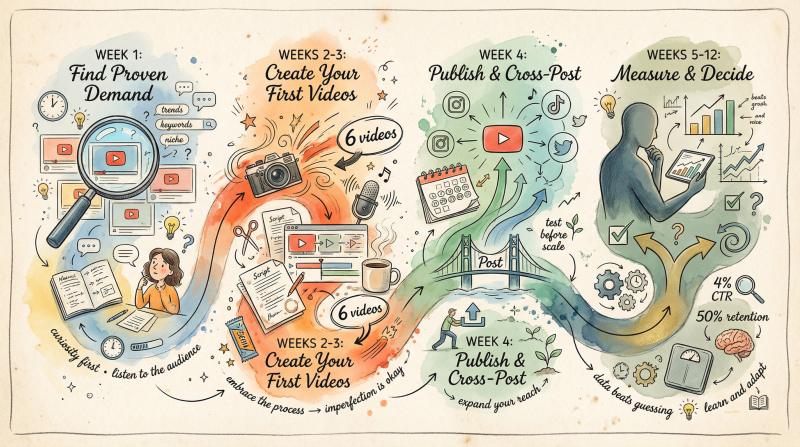
How to Test YouTube Automation in 30 Days (Without Wasting Money)
Most people fail at YouTube automation because they try to scale before they've validated their concept. They spend money hiring editors and voiceover artists before they know if their videos will get any views at all.
Smarter approach:
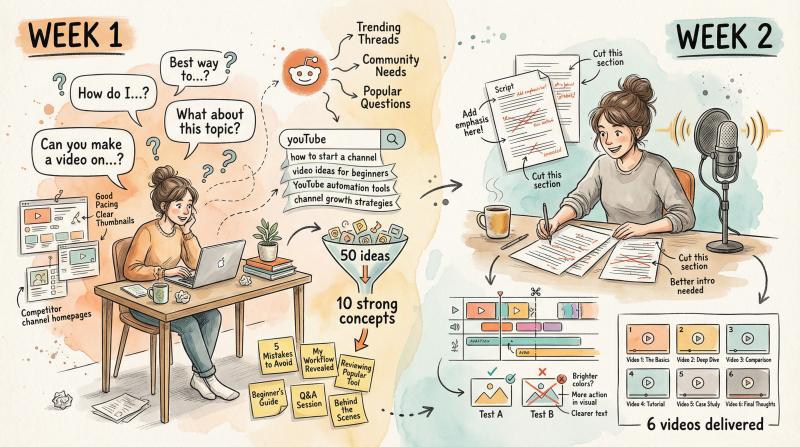
Week 1: Find Proven Demand Before Creating Anything
Your goal is to find proven demand before you create anything.
What to do:
- Mine YouTube comments on competitor videos. What questions are people asking repeatedly?
- Check Reddit threads in your niche. What problems come up over and over?
- Use YouTube's search suggestions. Type your topic + partial query and see what autocompletes
- Look at competitor channels with 10K-100K subscribers. What's their most viewed content? What gaps do they have?
Collect at least 50 potential video ideas. Then narrow to the 10 strongest based on clear demand signals. Write headlines that make a specific promise (not vague clickbait).
Week 2: Create Your First 6 Videos Yourself
Don't outsource yet. You need to understand the full production process before you delegate it.
Production checklist:
- Write scripts yourself, using AI as a research assistant but not as your final voice
- Record voiceover yourself or use high-quality AI (tools like ElevenLabs or Play.ht are way better than cheap text-to-speech)
- Edit for retention: strong hook in the first 5 seconds, deliver value by 30-40% through the video, cut anything that doesn't advance the story
- Create at least 2 thumbnail variations per video
Week 3: Publish and Cross-Post Your Content
Upload your videos to YouTube with optimized titles, descriptions, and tags. Don't overthink SEO, but do the basics.
Then use a tool like Post bridge to repurpose your content across platforms. If you created vertical video (9:16), it'll automatically post as a YouTube Short. You can simultaneously push it to Instagram Reels and TikTok.
This multiplies your distribution without multiplying your workload.
One key advantage of Post bridge: it prevents you from posting the exact same asset to multiple accounts on the same platform (which violates most platforms' Terms of Service). It forces you to stay compliant while still maximizing reach.
Week 4: Measure Your Results and Decide Next Steps
Watch three core metrics:
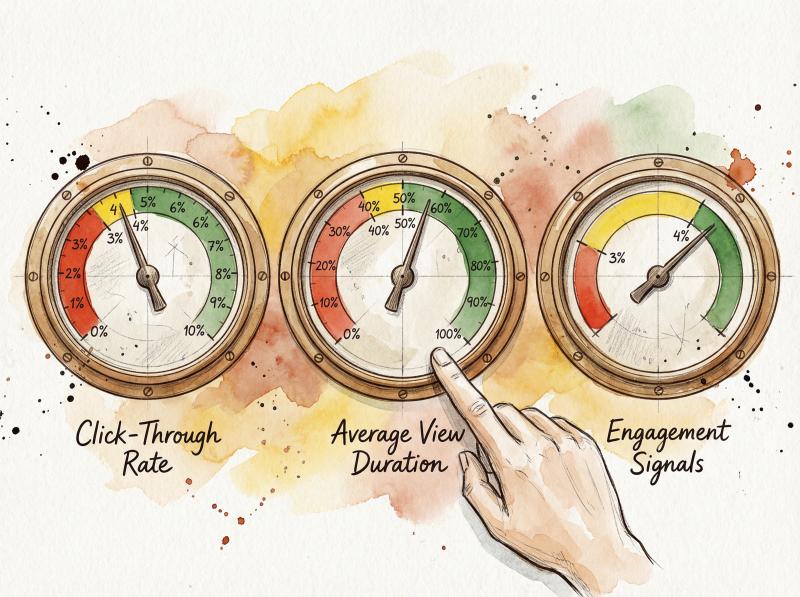
Click-through rate (CTR). If your CTR is below 3% after 1,000 impressions, your packaging (thumbnail + title) needs work. Test your alternate thumbnail.
Average view duration. What percentage of your video are people actually watching? If retention drops below 40%, your content isn't delivering on the promise your thumbnail made. Fix the hook or the pacing.
Engagement signals. Comments, saves, and likes tell you if people found the content valuable enough to interact with it.
Decision criteria:
- If 2+ of your 6 videos hit your internal benchmarks (e.g., 4% CTR and 50% retention), you've validated something. Now you can document your process and start outsourcing the repetitive parts.
- If all 6 flop, don't scale production. Instead, pivot your editorial angle or try a different niche. Automating bad content just gives you more bad content faster.
This validation sprint prevents the most common mistake: spending thousands to produce dozens of videos for a channel concept that was never going to work.
How to Scale YouTube Automation the Right Way
If you've validated your content works, sustainable automation looks like this in practice:
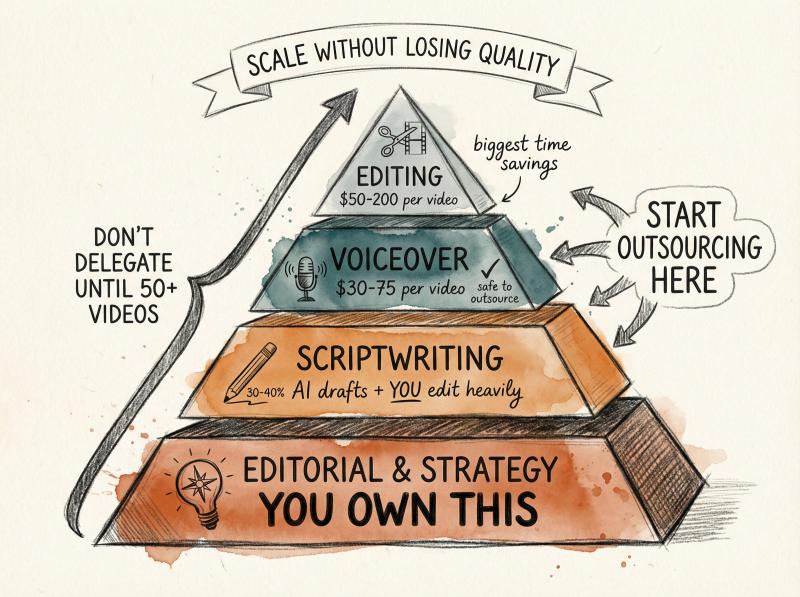
Editorial and strategy: You own this. You decide what topics to cover, what angle to take, and what the unique value proposition is. Don't delegate this to AI or freelancers until you've created at least 50 videos yourself and deeply understand what resonates.
Scriptwriting: Use AI to draft, then edit heavily. A good process is to give ChatGPT or Claude a detailed prompt with your angle, key points, and style guidelines. Take the output, cut 30-40% of the fluff, add specific examples or data, and inject personality. The AI handles structure, you handle insight.
Voiceover: Once you've validated your scripts work, you can outsource this to Fiverr or Upwork voice actors. Budget $30-75 per video for quality talent. If cost is a barrier early on, AI voice tools have gotten shockingly good (just avoid the obviously robotic free options).
Editing: This is where outsourcing makes the biggest impact. A good editor can take your script, voiceover, and B-roll direction and produce a finished video in a fraction of the time it would take you. Expect to pay $50-200 per video depending on complexity.
Create an editing template with your intro, lower thirds, transitions, and end screen. This gives your editor a clear starting point and ensures consistency across videos.
B-roll and stock assets: Build a library of licensed stock footage, music, and graphics. Keep a spreadsheet with license terms so you can prove commercial rights if YouTube asks. Unlicensed assets are one of the fastest ways to get demonetized.
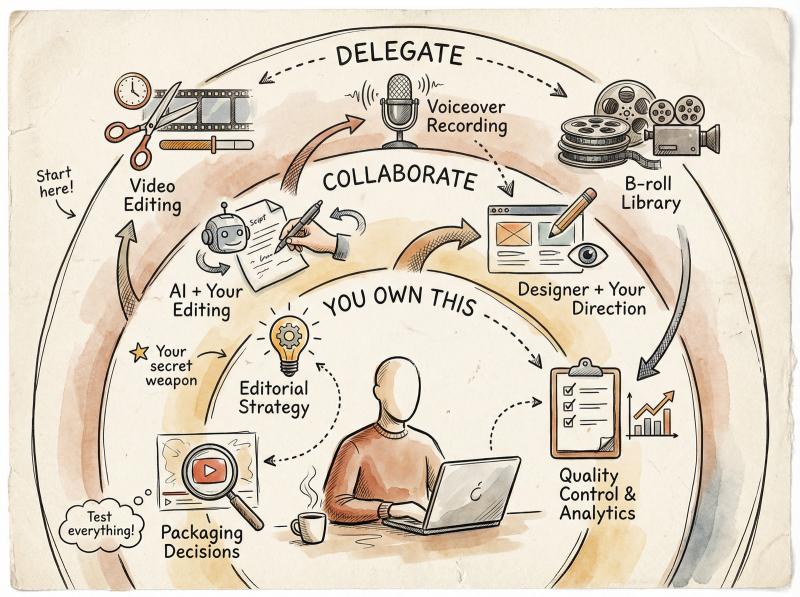
Thumbnails: Don't blindly outsource this. Your thumbnail drives your first 1,000 impressions, which means it's your highest-leverage asset. If you do hire a designer, give them extremely specific direction and test every thumbnail. One case study found that outsourcing thumbnails without quality control caused CTR to drop 50%.
Publishing and cross-posting: This is where automation tools really shine. Use Post bridge to schedule uploads across YouTube (long-form and Shorts), Instagram, TikTok, LinkedIn, and other platforms. The tool handles the technical work of formatting and posting, so you can maintain a consistent schedule without living in your calendar.
Particularly useful: Post bridge's TikTok draft feature lets you save videos as drafts in the TikTok app instead of posting them directly via API. Some creators believe this avoids potential reach penalties from third-party posting tools. You can test both approaches for your niche.
How to Scale Without Losing Quality
Once you have a system that works, you can start thinking about scaling up:
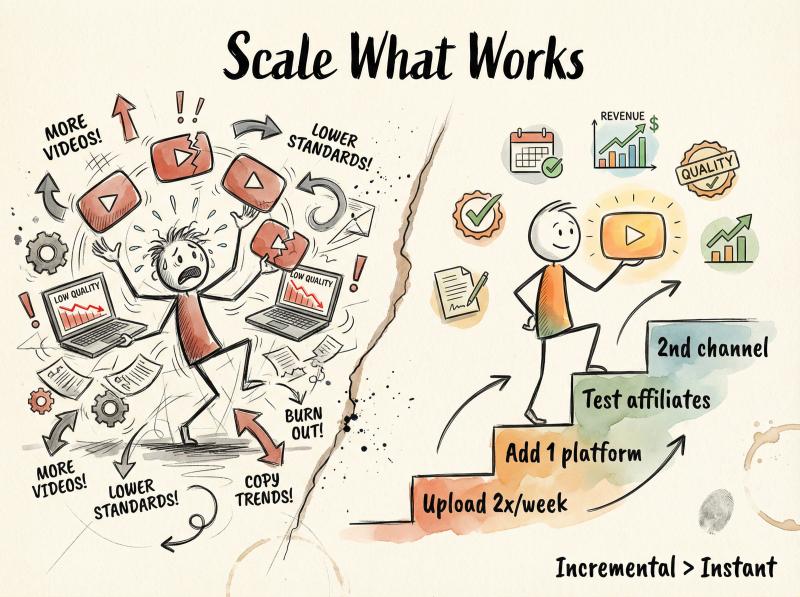
① Increase upload frequency from weekly to 2-3x per week by bringing on more editors or delegating research
② Launch a second channel in a related niche, using the same production system
③ Expand to more platforms beyond just YouTube, leveraging your content across short-form and long-form formats
④ Build multiple revenue streams beyond just AdSense (affiliates, sponsorships, digital products, memberships)
But (and this is critical) only scale what you've already proven works. Don't launch five channels simultaneously. Don't go from one video per week to one per day. Incremental scaling lets you maintain quality and adapt based on what the data tells you.
How to Make Real Money: Beyond YouTube Ad Revenue
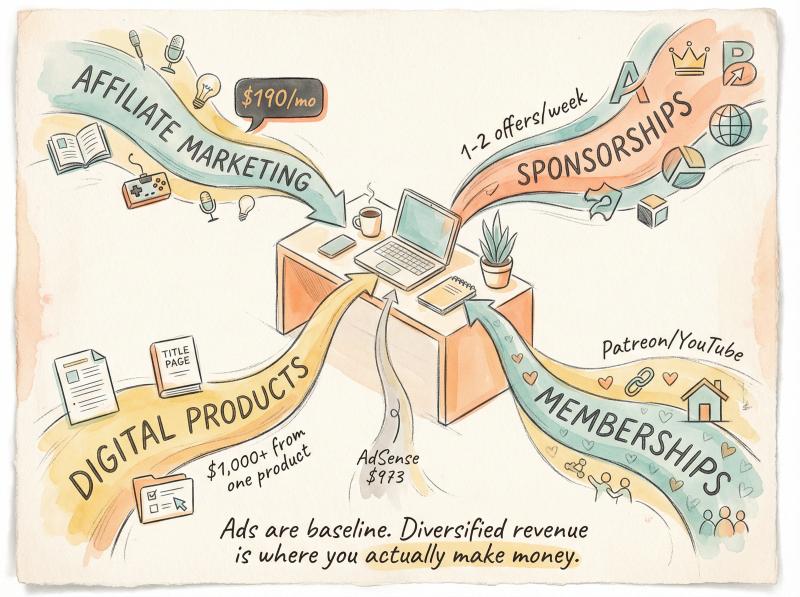
Relying solely on YouTube AdSense is usually the least efficient monetization strategy, especially for smaller channels.
Smarter revenue streams:
→ Affiliate marketing. Promote products or services related to your niche with affiliate links in your video descriptions. A tech channel can link to gadgets on Amazon. A finance channel can promote investing apps or courses. These can generate meaningful income even with modest view counts.
One creator with under 6,000 subscribers was earning $190 per month from affiliates alongside $973 in AdSense. The affiliates required no additional production work, just strategic product placement and honest recommendations.
→ Sponsorships. Even faceless channels can land sponsor deals once you have consistent views. Brands care about audience fit and engagement, not whether you're on camera. One creator reported getting 1-2 sponsorship offers per week with a channel under 10,000 subscribers in a business niche.
The key is building an email list of interested brands and pitching them directly, rather than waiting for them to find you.
→ Digital products. If your channel solves a specific problem, you can create a paid product that goes deeper. Templates, guides, courses, or tools that serve your audience. One small channel reported making over $1,000 from a single digital product, far exceeding their ad revenue for that period.
→ Memberships. YouTube's built-in memberships (and platforms like Patreon) let engaged viewers support you directly in exchange for bonus content or community access. This works even for faceless channels if you've built a loyal audience.
The pattern successful automated channels follow: ads are the baseline, but diversified revenue is where you actually make money. This also protects you from algorithm changes or ad rate fluctuations that could tank a channel dependent on AdSense alone.
How to Stay Compliant with YouTube's 2025 Policies
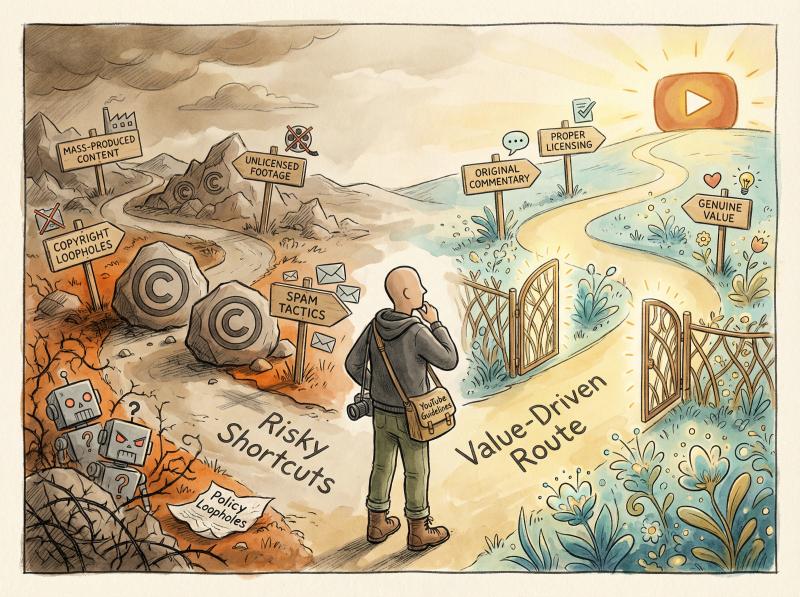
YouTube's policies evolve constantly, and 2025 has seen significant enforcement increases. What you absolutely need to get right:
Copyright and licensing. Every piece of music, footage, and imagery in your videos needs to be either original, licensed, or legally used under fair use. "Royalty-free" doesn't always mean "free for commercial use on YouTube." Read the license terms. Keep receipts.
One unlicensed track can trigger Content ID claims that redirect all your revenue to the rights holder. Multiple violations can get your entire channel demonetized or terminated.
Disclosure requirements. If your video contains realistic synthetic or altered media (AI-generated people, deepfakes, voice cloning of real individuals), YouTube now requires disclosure. This shows up as a label on your video that says "Altered or synthetic content."
Using AI for scripting or generic voiceover? No disclosure needed. Creating a video that makes it look like a celebrity said something they didn't? Disclosure required.
Reused content policy. This is where most automated channels get burned. YouTube's monetization reviewers will deny channels that appear to be "mass-produced" or that rely too heavily on content from other sources without meaningful transformation.
Safe: Using stock footage with original narration that teaches something new
Risky: Compiling clips from other YouTube videos even with attribution
Dangerous: Creating dozens of nearly identical videos using the exact same template and minimal editing
If you're using third-party content (movie clips, news footage, etc.), you need to add substantial commentary, education, or critique. Just slapping a voiceover on someone else's content won't cut it.
Spam and deceptive practices. Don't try to game the system with view bots, sub-for-sub schemes, or misleading metadata. YouTube's detection has gotten extremely sophisticated. Channels that artificially inflate metrics get banned, often without warning.
The safest path: build your content strategy around adding genuine value, not finding policy loopholes. YouTube's enforcement will only get stricter over time.
Is YouTube Automation Actually Passive Income?
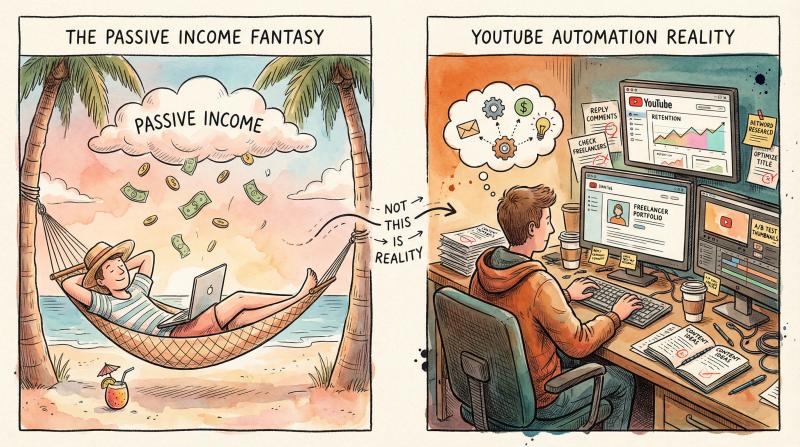
Let's kill this myth once and for all: YouTube automation is not passive, especially at the start.
Even successful multi-channel operators who've outsourced most production still spend significant time:
- Researching content ideas and tracking performance
- Managing freelancers and maintaining quality control
- Optimizing thumbnails and titles based on analytics
- Responding to comments and building community
- Staying current on platform changes and algorithm updates
- Developing new revenue streams beyond AdSense
One creator who runs multiple successful faceless channels put it bluntly: "It's a sport for people with excellent writing abilities." Translation: you can't automate good ideas or compelling storytelling. Those still require human judgment and creativity.
The dream of "set it and forget it" income is marketing. The reality is YouTube automation is a real business that requires ongoing strategic input. You can absolutely reduce the time you personally spend on production, but you'll always need to be involved in decision-making and optimization.
Over time, as your systems mature and your team gets trained, you can step back from day-to-day operations. But getting to that point takes months or years of active work.
If that sounds like too much effort, YouTube automation probably isn't the right path. But if you're willing to treat it like building any other business (with investment, patience, and iteration), the economics can work.
What Tools Actually Help with YouTube Automation?
There's no shortage of YouTube tools promising to "automate growth" or "hack the algorithm." Most are overpriced or ineffective. What's actually worth using:
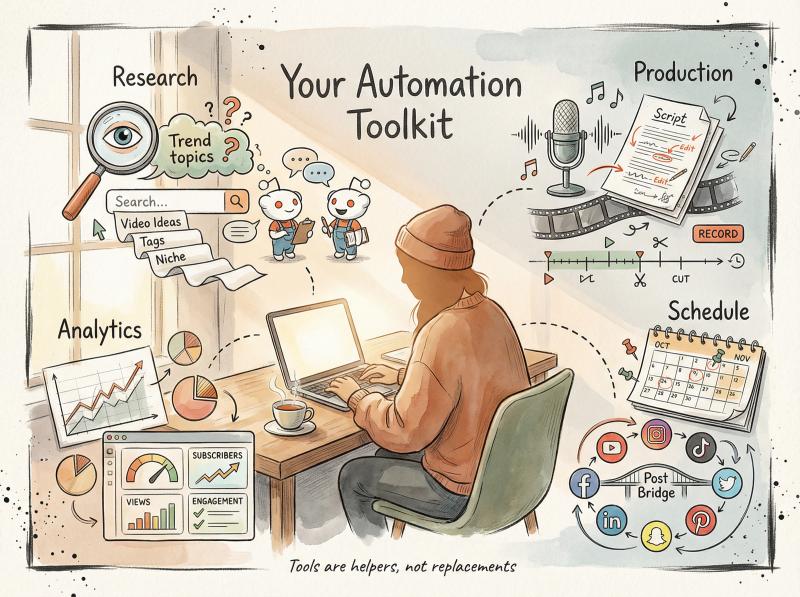
Category - Essential Tools - Avoid
- Research & Ideation - YouTube search/autocomplete (free), vidIQ or TubeBuddy, Google Trends, Reddit mining - Paid "growth hacks" courses
- Production - ChatGPT/Claude (script drafting), ElevenLabs/Play.ht (AI voice), Canva/Photoshop (thumbnails), Premiere/DaVinci/CapCut (editing) - Auto-generators that produce low-quality thumbnails
- Scheduling & Distribution - Post bridge (multi-platform), Auto Shorts detection, TikTok draft posting - View/subscriber booster services
- Analytics - YouTube Studio (built-in), Google Analytics - Auto-commenting bots
What to avoid:
- "View booster" or "subscriber booster" services (will get you banned)
- Auto-commenting bots (flagged as spam)
- Thumbnail generators that just slap text on stock images (low quality shows in CTR)
The right tools remove friction from your workflow. But tools don't create content ideas, and they don't build audience relationships. Use them to enhance efficiency, not as substitutes for strategy.
Why Multi-Platform Distribution Matters for Faceless Channels
One of the biggest advantages of faceless content is that it's platform-agnostic. A video about "5 mistakes new investors make" works equally well on YouTube, Instagram, TikTok, and LinkedIn. The same content, reformatted slightly, can reach entirely different audiences.
The play:
Create one long-form YouTube video (8-15 minutes). Then repurpose it:
- Cut a 60-second highlight for YouTube Shorts, Instagram Reels, and TikTok
- Pull quote graphics for Twitter/X and LinkedIn
- Extract the audio for a podcast episode
- Turn key points into a blog post or carousel
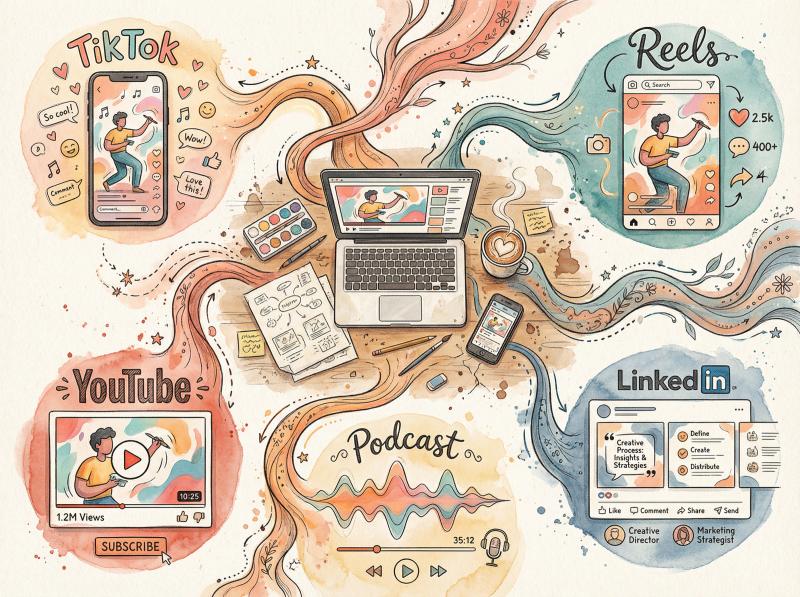
This isn't busywork. It's maximizing distribution for content you've already produced. And tools like Post bridge make it practical by handling the scheduling and reformatting automatically.
Particularly valuable: Post bridge enforces platform compliance by preventing you from posting the same asset to multiple accounts on the same platform (which violates ToS and could get the tool's API access revoked). It keeps you on the right side of platform rules while still maximizing reach.
Plus, diversifying platforms protects you from algorithm changes on any single platform. If YouTube suddenly deprioritizes your niche, you've still got traction on TikTok and Instagram.
When Should You Outsource YouTube Production?
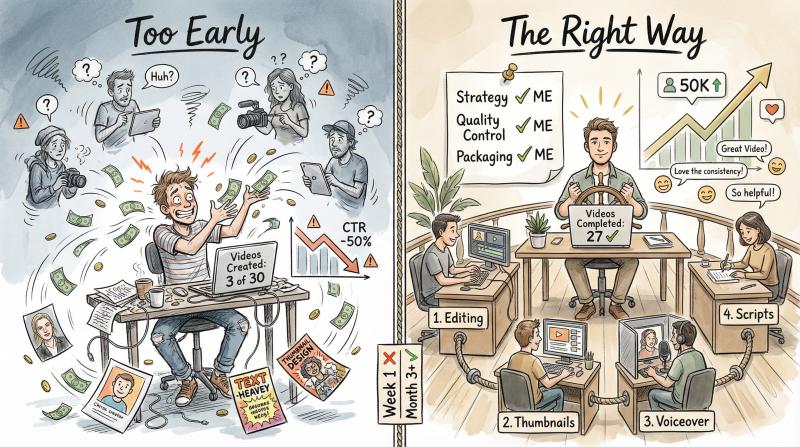
This is where most new creators make expensive mistakes. They outsource too early, before they understand what makes their content work.
Don't outsource until:
- You've personally created at least 20-30 videos in your niche
- You have clear data on what formats and topics perform best
- You can articulate exactly why certain videos succeed and others flop
- You've documented your process well enough to train someone else
Outsource in this order:
- Editing (biggest time savings, relatively easy to delegate)
- Thumbnail design (but maintain creative control and test everything)
- Voiceover (once you've validated your scripts)
- Script drafting (but you still need to edit and inject insight)
Never fully outsource:
- Content strategy and topic selection
- Packaging decisions (thumbnails and titles)
- Quality control and analytics review
These are the leverage points that determine whether your channel succeeds or fails. Delegating them to someone who doesn't understand your audience is a recipe for mediocre results.
One creator's experience is instructive: they outsourced thumbnail design to a Fiverr freelancer without giving specific direction. The freelancer created technically competent designs, but they didn't understand the channel's niche or audience. CTR dropped 50%.
The creator had to take back control of thumbnails and rebuild from first principles.
The lesson: automation is about scaling what works, not abdicating responsibility for your channel's success.
What Makes YouTube Automation Channels Succeed Long-Term?
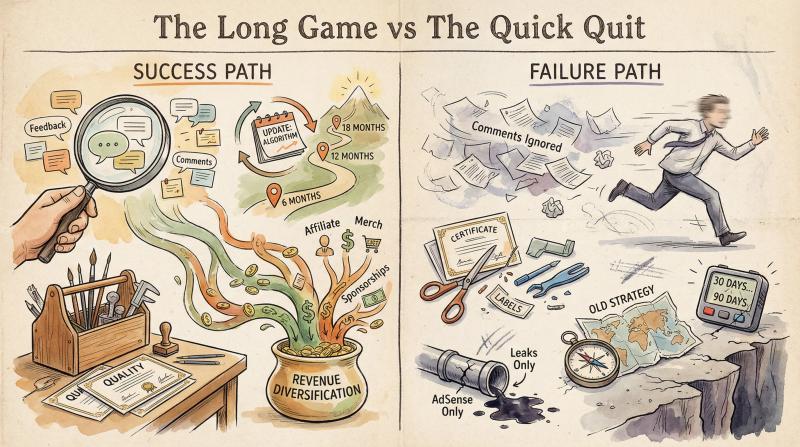
The faceless channels that survive and thrive long-term share a few key characteristics:
They obsess over audience feedback. Winners read every comment, track which topics generate the most engagement, and continuously refine based on what their audience actually wants (not what they think the audience should want).
They treat quality as non-negotiable. Even as they scale production, they maintain editorial standards. Scripts are well-researched. Editing is tight. Thumbnails are tested. There's no "good enough for an automated channel" mentality.
They diversify revenue early. They don't wait until they have 100K subscribers to think about sponsorships or affiliates. As soon as they have traction, they're building multiple income streams.
They stay on top of platform changes. YouTube's algorithm, policies, and features evolve constantly. Winners adapt quickly. They experiment with new formats (like Shorts when they launched), test new features, and pivot when something stops working.
They have realistic timelines. Most successful faceless channels took 6-18 months to reach sustainable income levels. Not 30 days, not 90 days. Years.
The channels that fail share different patterns:
- They chase scale before validation
- They cut corners on quality to save money
- They rely entirely on AdSense and never diversify
- They ignore analytics and keep producing content nobody wants
- They give up after 10-20 videos because "it's not working fast enough"
YouTube rewards patience and iteration more than it rewards hustle and volume.
Should You Actually Try YouTube Automation? The Honest Answer
Let's cut through all the nuance and get to a clear answer.
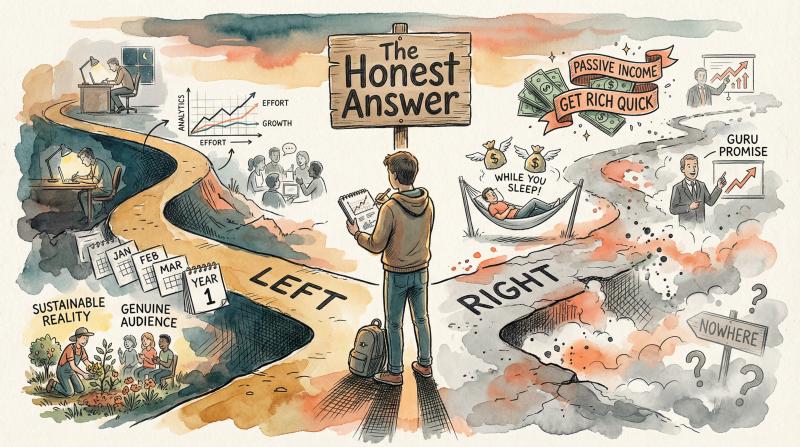
YouTube automation can work if:
- You're willing to treat this like building a real business, not a passive income hack
- You can commit to 6-12 months of consistent effort before expecting meaningful income
- You have budget to invest in production (at least $500-1000 to start)
- You're genuinely interested in the niche you're choosing (because you'll be immersed in it for years)
- You can accept that most of your early videos will underperform while you learn
- You understand how to create content that delivers genuine value to viewers
YouTube automation probably won't work if:
- You're looking for quick money with minimal effort
- You think you can just copy what worked for someone else
- You're not willing to learn about analytics, SEO, and audience psychology
- You can't afford to lose your initial investment
- You give up easily when things don't work immediately
- You're uncomfortable with the uncertainty of entrepreneurship
The brutal truth: most people who try YouTube automation will fail. Not because the model doesn't work, but because they approach it with unrealistic expectations and insufficient commitment.
But the people who do succeed (and there are plenty) often build genuinely valuable assets. Channels that generate revenue for years. Skills that transfer to other platforms and business models. Audiences that can be monetized in multiple ways.
Is it passive? No. Is it easy? Definitely not. Can it work? Absolutely, if you're willing to do what most people won't.
How to Test YouTube Automation in 90 Days: Your Action Plan
If you're still interested after reading this far, my recommendation:
Commit to 90 days. In that time:
- Pick one niche you're genuinely interested in and have some knowledge about
- Create and publish 20-30 videos (mix of long-form and Shorts)
- Learn the full production process yourself before outsourcing anything
- Track your analytics obsessively and iterate based on data
- Build systems and templates that could eventually be delegated
- Cross-post to multiple platforms using Post bridge to maximize distribution
At the end of 90 days, evaluate honestly:
- Did any of your videos gain meaningful traction?
- Do you understand why some performed better than others?
- Can you see a path to 1,000 subscribers and 4,000 watch hours?
- Are you still interested in the niche, or are you burned out?
If the answers are mostly positive, you've validated the concept and can start scaling with outsourcing and automation. If the answers are mostly negative, pivot to a different niche or abandon the strategy entirely.
This 90-day test protects you from the worst-case scenario: spending months or years grinding on a channel concept that was never going to work.
The Bottom Line on YouTube Automation
Does YouTube automation work? Yes, but only if you redefine what "automation" means.
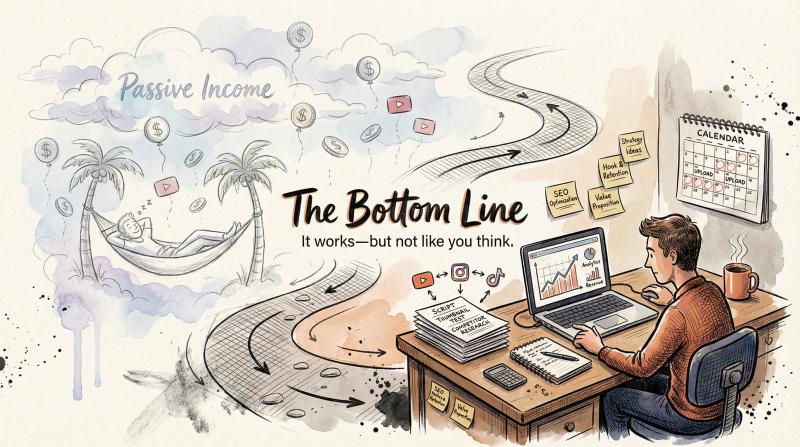
It's not about creating a hands-off money machine. It's about building systems that let you scale content production without sacrificing quality. It's about using tools and outsourcing to remove friction from proven workflows.
The creators making real money with faceless channels aren't doing anything magical. They're researching what their audience wants, creating content that delivers on that promise, packaging it well, and distributing it consistently across platforms. Then they're using automation to do more of what works, faster.
The course sellers and gurus selling "passive income" dreams are (mostly) selling fiction. The actual work is harder, slower, and less glamorous than the sales pitch.
But if you're willing to do the real work (strategy, iteration, quality control, audience building), faceless YouTube channels can absolutely generate meaningful income. Some creators earn a few hundred dollars a month as side income. Others build six and seven-figure businesses.
The difference isn't luck or secrets. It's execution, patience, and treating YouTube like a legitimate business rather than a lottery ticket.
So yes, YouTube automation works. Just not the way most people think it does.